
It's Friday morning. Caroline from Customer Success gets a calendar pop-up: "Engineering demo meeting in 5 min". She sighs. "Another thirty minutes of technical rambling. Maybe I'll get something useful this time."
Across the continent, David from engineering sees the same message and panics. He's giving today's demo for his squad. Last week, the team heard that their demos weren't landing well.
Both feel the friction, but for different reasons.
Why demos matter (and why they fail)
Engineering teams hold demos to share what they've built. It's a straightforward practice. But demos often fail to create the awareness and understanding they're meant to.
Here's why different people show up:
- Customer Success wants to know about upcoming features and bugfixes so they can set customer expectations and celebrate wins
- Support cares about bugfixes and internal tooling that makes their job easier
- Sales wants impactful new customer-facing features they can use in pitches
They all want to attend. But many don't, saying "I don't have time" or "I don't understand the technical jargon."
The root cause: The engineering team isn't adapting the message to the audience.
When demos are too technical or too detailed, people zone out before the real value lands. The solution isn't better slides. It's understanding what each audience actually needs to hear.
Lead with why
Don't start by showing what changed. Start by explaining why it matters.
Who is affected? What problem does this solve? What was broken before?
When David mentions that a new feature unlocks compliance in Germany, Sandra from Sales leans forward. That's a market she can sell into. Suddenly, the technical details have context.
The magic isn't in what you built. It's in the business impact of what you built.
Show the happy path only
A frequent mistake: showing acceptance criteria, edge cases, and everything that could go wrong.
Skip all of that. Show one clear example of the happy path. If your audience wants details, they'll ask for it.
Example: The orders page now has 5 new filters. David demonstrates one filter, showing how it applies instantly without an extra button click. He mentions the other four exist and that filters persist when revisiting the page. Done.
Your job is to show what was delivered and how people will use it. You're not running QA.
Focus on delivery, not effort
Whether you spent 10 minutes or 10 days building something doesn't matter in a demo. The delivery is what counts.
Don't justify yourself. Don't explain how hard it was. Don't defend the time investment. It puts you on the defensive and distracts from what actually happened.
If effort needs to be discussed, save it for a separate conversation. The demo is about what your audience can now do with this work.
Include bugfixes (they're often more important)
David realises that Susan from Support doesn't care about new features. She cares about bugfixes, because her team has to explain issues to frustrated customers.
Not every bugfix deserves screen time. Small fixes can be mentioned in passing. But the fixes your audience cares about should get attention.
For the important ones: Show the correct behaviour and briefly mention what was broken. Don't show the bug and the fix. That's confusing. Just show the working state.
If you're shipping a quick fix that's not a real solution, mention it. Explain the tradeoff. Your support team will appreciate knowing when they're managing a temporary patch versus a permanent fix.
Translate technical work into business value
David's team significantly improved performance on key endpoints. They just added database indexes; simple work with objective impact. Is it worth demoing?
Yes. Absolutely.
For performance improvements, show before-and-after metrics. Users understand numbers. Customer-facing teams can use concrete gains to influence difficult conversations.
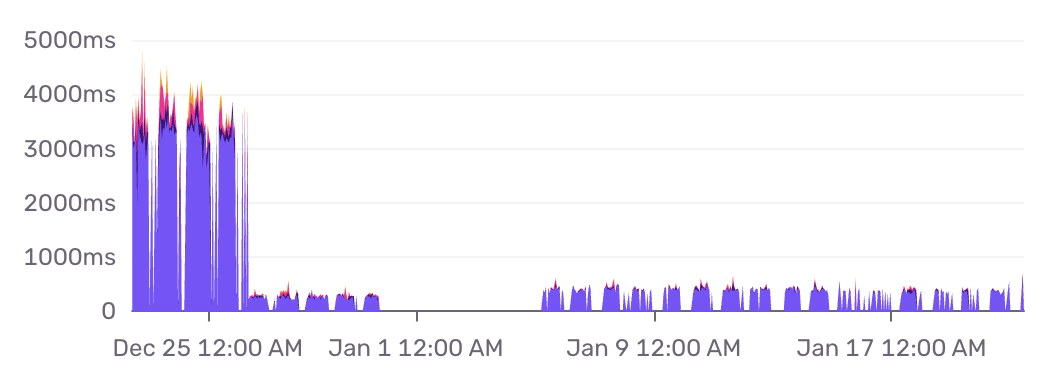
For security fixes, describe what the product is now protected from. Sales won't understand CVE numbers, but they understand "prevents account takeover."
For dependency bumps, explain what the company gets: security patches, performance gains, compliance, or reduced tech debt.
Every technical decision has a business consequence. Make that connection explicit.
Keep demos separate from planning
Don't discuss work in progress. It opens the floor for scope discussions, roadmap debates, and yes-but comments that derail the demo.
If people need to know about upcoming work, share it separately. Link to your project management tool or send a message after the demo. You're not conducting a status update. You're celebrating delivery.
Record and share
Some people can't attend. That's okay. Record the demo and share it with the wider team.
Awareness matters. When your support team sees a bugfix being demoed, they understand the feature deeply and can explain it to customers. When sales hears about a new capability, they're energised to pitch it. When product sees what was shipped, they understand how it compares to the roadmap.
It's better to overshare than to undershare.
The practice
Good demos require intention. They're not just live events, they're communication artefacts. They shape how your organisation understands what you're building and why it matters.
Start with your audience. Lead with why. Show the happy path. Translate everything into their language. Then watch awareness and understanding improve.
This is the way.