



Nobody likes writing documentation. Everybody agrees it’s important, but nobody volunteers for it. Most companies still manage to get a first version on paper. Keeping it up to date is where things fall apart. A few months go by, the product changes and the document that used to help quietly turns into a liability. Readers stop trusting it.
In our technical due diligence audits, we review five categories of documentation that a SaaS company needs: operational, product, technical, API, and customer-facing. Each serves a different audience, lives in a different place, and needs humans to keep them current.
We now have a colleague who doesn’t mind reading every commit, every pull request, and every UI change. AI will dutifully cross-check the documentation against the product’s current state and tell us what’s drifted. The interesting question is no longer whether to use AI for documentation. It’s where each type of documentation belongs now, and how much of the work can be handed off.
Operational documentation
How do I take a day off? Who do I reach out to about my pay? What’s the remote work policy? New team members need answers to these questions on day one, and those answers live in operational documentation. It’s typically owned by HR and stored in the company’s digital workplace, such as Notion, Confluence, or SharePoint.
Most modern digital workplaces now ship with an AI assistant out of the box, or are well on their way to one. Instead of digging through pages, employees ask a chatbot. If yours doesn’t have one yet, connecting an LLM via an MCP gives you the same outcome with a bit more setup.
What you don’t need here is an AI agent maintaining the documentation. Operational docs change infrequently, and when they do, it’s because of a deliberate policy decision. Those changes belong with HR, not with an automated agent. The leverage from AI here is in finding the information, not maintaining it.
- Where it lives: Digital workplace. Examples: Notion, Confluence, SharePoint
- Audience: Internal, all employees
- Rate of change: Low
- AI leverage potential: Low
- Maintenance: Manual
Product documentation
Product documentation captures the concepts that make up your product. Not user manuals, but a structured explanation of the domain: the entities, the relationships, the rules. The top level usually mirrors the high-level domain model, with subsections drilling down into specifics. It’s one of the hardest types to write well. Too sparse, and it doesn’t help anyone; too verbose, and nobody reads it. You usually start at the top and only go deeper where the same questions keep coming up.
Keep the technical details out of this one. The audience is broad: designers, customer success, sales, finance, and new product managers. They need to understand the business concepts, not the database schema. This documentation belongs in a wiki inside the digital workplace, where non-technical colleagues can browse it and contribute to it. Moving it closer to the code is tempting from a maintenance perspective, but the cost is that half the audience can no longer reach it.
The hardest part of product documentation isn’t writing it. It’s keeping it aligned with the product. Every feature change risks invalidating a section somewhere, and you rarely catch the drift in real time. This is where AI earns its keep. For pull requests that affect product behaviour, an AI agent can compare the change against the existing documentation and propose updates. The documentation stays close to its audience and ultimately moves at the product’s pace.
- Where it lives: Digital workplace wiki. Examples: Notion, Confluence
- Audience: Internal, all employees, especially non-technical roles
- Rate of change: High
- AI leverage potential: High
- Maintenance: Automated
Technical documentation
Technical documentation captures how the system actually works. The first layer is the code itself. Well-named functions and well-structured modules carry a surprising amount of documentation for free. Beyond that, you need an architectural overview and a getting-started guide.
The architectural overview used to live in a separate diagramming tool, such as Miro, away from the code. That separation has stopped making sense. Mermaid or Structurizr C4 diagrams in the repository are much easier to keep in sync, especially when the same LLM that writes your features can also update the diagrams in the same pull request. The getting-started guide belongs in the README. It should help a new engineer set up their environment and have something running before they finish their first coffee.
Keep technical documentation as close to the code as possible. The closer it sits, the easier it is for an LLM to keep it fresh, and the more likely a human reviewer is to catch a missed update during code review. Documentation changes ride along in the pull request and go through the same review process as the code.
- Where it lives: Source control. Examples: GitHub, GitLab, BitBucket
- Audience: Internal, engineers
- Rate of change: High
- AI leverage potential: High
- Maintenance: Automated
API documentation
API documentation has been a solved problem for years. Generate it from the code using OpenAPI annotations, publish it via Swagger UI as part of CI/CD, and move on. There’s nothing meaningful here for a separate AI agent to do that the existing toolchain isn’t already doing. If you’re still maintaining your API docs by hand, that’s the project to fix this quarter.
- Where it lives: Auto-generated
- Audience: Internal and external, engineers
- Rate of change: High
- AI leverage potential: Low
- Maintenance: Automated
Customer-facing documentation
Customer-facing documentation is where things get interesting. User guides, tutorials, FAQs: anything that helps a customer use your product. Keeping it current is challenging. Most guides rely on screenshots, and the smallest UI change invalidates them. A user lands on an outdated page, sees a screenshot that doesn’t match what’s in front of them, and loses trust. From there, every doubt about your product becomes an extra burden on your support team.
This documentation lives in dedicated knowledge base or help-centre tools: Intercom, Zendesk, HubSpot, Help Scout, and Document360. All the modern ones now ship with an AI assistant that your customers can talk to.
What separates a good knowledge base from a great one is what you feed it. Generic answers, “here’s how this feature works”, are useful but limited. The leap happens when the assistant can also see how the feature is configured for the specific user asking the question. At that point, it stops being a knowledge base and starts behaving like a personal assistant. The mechanism sounds simple: pull the user’s relevant data and pass it as additional context to the assistant via RAG. In practice, it isn’t. Identity verification, scoped data access, and retrieval logging are not optional. A chatbot that confidently answers with the wrong user’s data is a worse failure mode than no chatbot at all. Treat the personalisation layer with the same care as any other authenticated API.
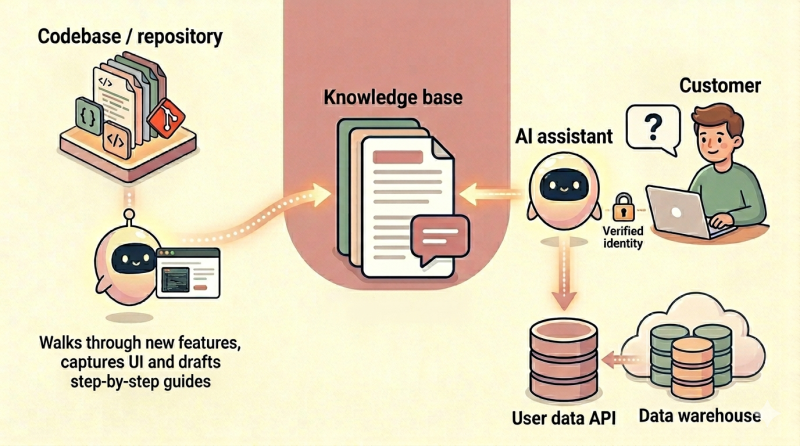
It goes beyond looking up information; AI can also help in documentation creation. When combined with an AI agent, Playwright can take a freshly merged feature, click through it, capture screenshots, and draft a step-by-step guide. The team still reviews and refines, but the cold start is gone. Instead of dreading the next release notes, you have a draft waiting before the feature ships.
- Where it lives: Knowledge base / help centre. Examples: Intercom, Zendesk, HubSpot
- Audience: External, customers
- Rate of change: High
- AI leverage potential: High
- Maintenance: Automated
Where this leaves us
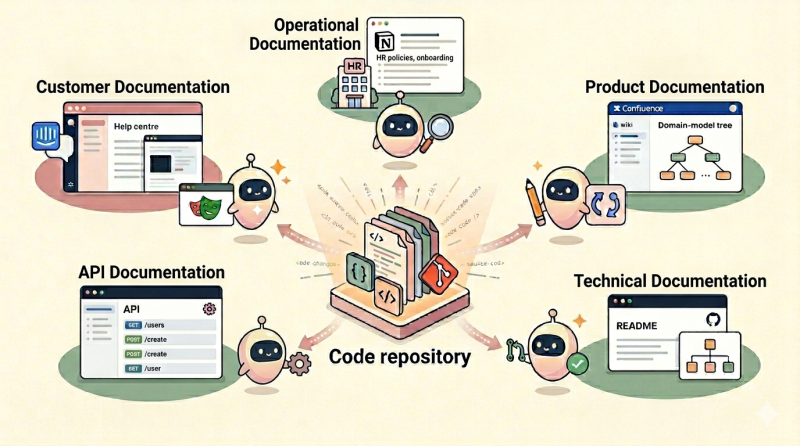
Stripping it back, two questions matter for each type of documentation. Where does it belong, given who reads it? And how much of the maintenance can AI take off your plate?
Operational documentation stays where it is and benefits from a chatbot on top of it. Product documentation stays in the wiki, but gets an agent watching the codebase to keep it honest. Technical documentation moves into the repository and becomes part of the pull request. API documentation continues to be generated from the code. Customer-facing documentation gets two AI mechanisms: one that drafts new pages from new features, and one that personalises answers using the customer’s own data.
None of this works if you still treat documentation as a one-time write. The point of bringing AI into the loop is that you no longer need a hero to volunteer for the rewrite. What you need is a system where every change to the product automatically touches its documentation. Get that right, and documentation stops being a liability waiting to mislead someone. It becomes part of how the product ships.
Keep a human in the loop
AI proposes, a person approves. The reviewer changes by type: engineers reviewing the pull request for technical docs, a product manager checking the wiki, customer success signing off on a generated help article, but the principle doesn’t change. AI is fast and tireless, which is precisely why the output deserves a moment of human judgement before it ships.
A word of caution
The temptation, once you see this picture, is to start an engineering project to build it. Resist that urge. Streamlining documentation is not what your company sells. It’s plumbing, and treating it as a build project is a great way to burn engineering time on something that already exists in commercial form.
For most of these layers, off-the-shelf is the right answer. Notion, Confluence, GitHub, Swagger UI, and Intercom: these tools have been refined over the years and ship with AI mechanisms baked in. A handful of small scripts are unavoidable. The agent that keeps product documentation in sync from the CI/CD pipeline. The pipeline that walks through new features to draft customer-facing guides. The integration glue that wires your user data into the support chatbot. These are scripts, not platforms.
Customer-facing documentation is where the pull to build is strongest, because the architecture sounds simple: a knowledge base, a chatbot, and some user data piped in. It’s harder than it looks: identity verification, escalation flows, audit logging, multi-language support, conversation analytics, and a long tail of edge cases. Established vendors such as Decagon, Sierra, or Intercom Fin have already absorbed all of that. Reinventing them in-house is rarely worth the engineering quarters it consumes. Use engineering effort where it actually moves the product forward.


