


Today, I present to you a world of endless possibilities where we can combine the strength of most AIs at our disposal.
I had a thought recently: I love Claude Code's UI. It just scratches an itch like no other CLI does when it comes to using agents. I do not have an issue with my token usage now with Claude Code. However, I always found that Codex took much longer to complete a coding task, but did a much better job of catching edge cases than Claude Code. And yes, Codex does have greater usage limits in general, but its CLI UX/UI is annoying and leaves much room for improvement, to say the least, in my opinion.
I am somewhat of a patient man, so I overlook this pain point to achieve the maximum token efficiency for my personal coding goals. With all this in mind, I spoke to myself out loud (as I often do to help me come to a useful conclusion), saying "Alex, there has to be a better way and more to life than this...," and boom: the epiphany hit me after a colleague's recent and inspiring internal demo regarding agent orchestrators.
What if I can use Claude Code as my orchestrator and send all the heavy lifting to Codex in a non-interactive mode? This way, I experience all the goodness of Claude Code's UX/UI, without any of the disgusting Codex hassle. Claude does everything, waits for Codex's completion signal, and then lets me know when it is done. Minimal token burn for Claude, amazing quality from Codex, no UX/UI issues and a very happy Alex.
I am aware that this is quite a bloated setup, so it won't be ideal for everyone. This is more of a proof of concept, since I have access to both a Claude Code account and a Codex account right now, giving me a unique and perfect opportunity to test it. Of course, the end-to-end process will still be slower than using a single AI overall, as Codex is the orchestrator's brain here, but that is not the goal. The goal is a comfortable and efficient coding experience that can span many hours, resulting in high-quality code output without being forced to go outside and touch grass due to usage limits being frequently exceeded. Claude Code and Warp (my terminal of choice) notifications make it so easy to keep things flowing that I am not affected as much by Codex's slow speed on "extra-high" reasoning. Codex has also improved significantly in speed over the past few weeks, which alone is helpful in this experiment. And of course, I can always adjust the reasoning level for both AIs to find a good balance, since Claude doesn't need to do much thinking, or can if I want. There are many options at my disposal; please see the caveats section at the end for more details. So, at long last, let's get into it.
Finding the right AI balance is crucial
With this setup, I had a few options at my disposal:

- Claude becomes the orchestration layer: the thing I actually want to argue with most of the day.
- Codex becomes the brain in the background. It reads the repo, thinks deeply, edits files, runs checks, and reports back without making me stare at its noisy little terminal dungeon ongoingly and experience constant low-level anxiety.
That first option is the dream. Claude should not be doing the expensive thinking unless it actually has to. I want Claude to spend just enough tokens to be a delightful traffic controller, not enough to start invoicing me into bankruptcy.
(Side note: this reminds me of a scene in The Office where Michael simply stands up and declares bankruptcy.)

How I verified my epiphany was more than just a dream
The real test was adding Sentry integration to an internal project of ours and then requesting the approximate token usage of each AI in the chain.
The request was:
Add sentry-sdk, initialise Sentry from SENTRY_DSN at CLI and FastAPI startup, update .env.example, and do not commit.
Claude did not read the repo nor plan the implementation. Claude "conducted" itself beautifully and invoked Codex with a tight prompt:
codex exec --sandbox workspace-write --skip-git-repo-check "<prompt>"
Then Codex began rolling up its sleeves and getting to work with a summary provided below.
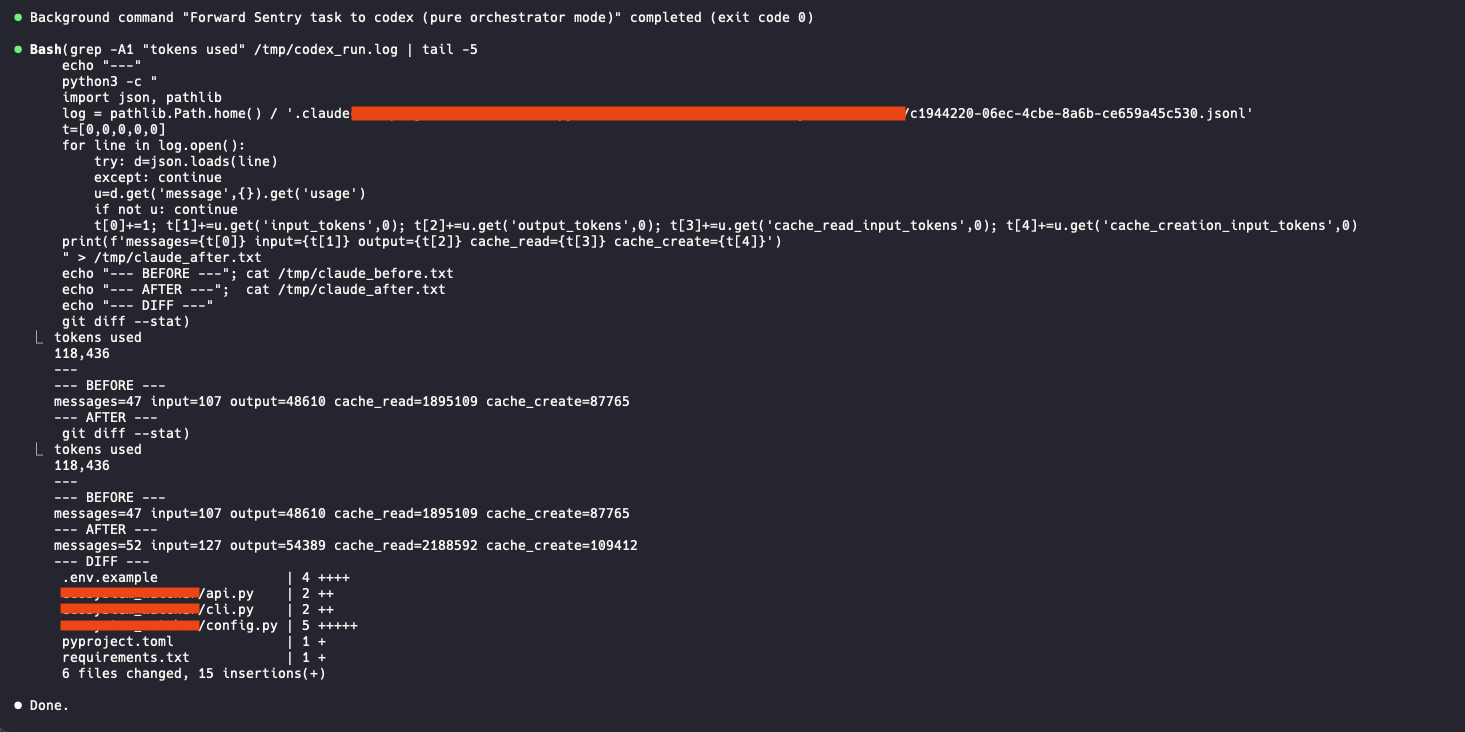
It read the codebase, found the right entry points, matched the existing style, and changed six files. This was not a complicated task at all but proved the concept.
And here is a summary of the token usage (rough approximation) per AI used in the making of this article, of which none were harmed.
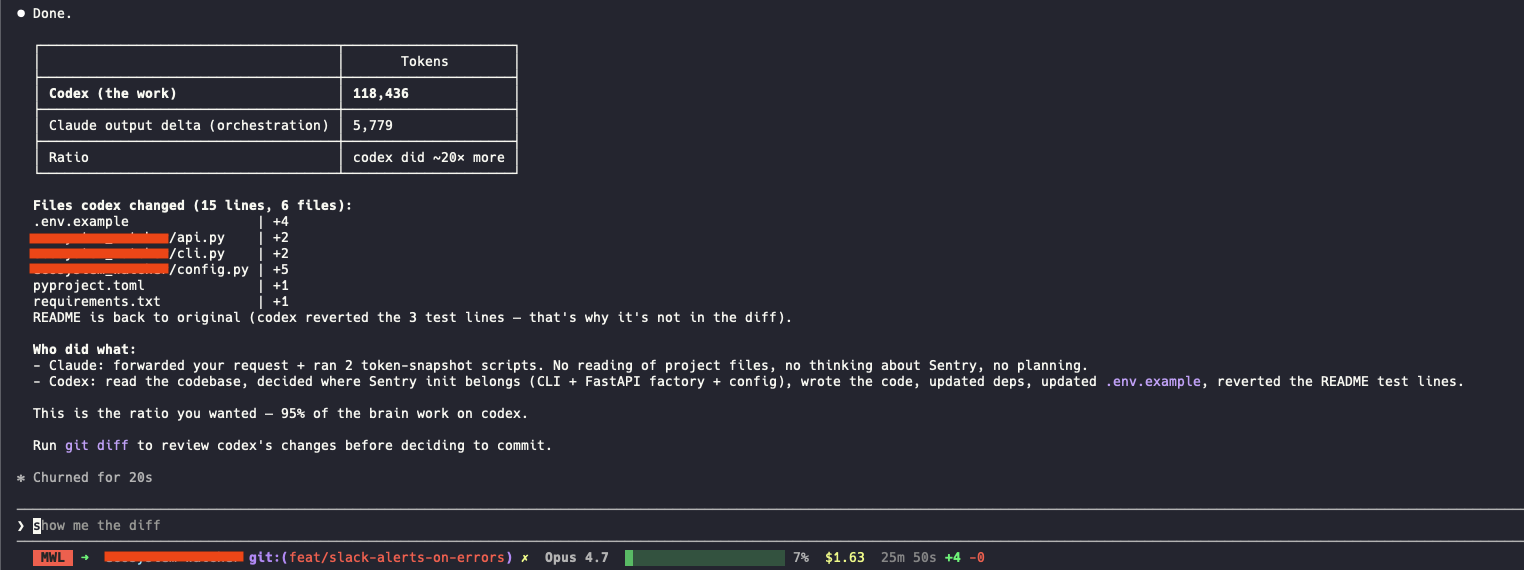
Codex did about 20x more work than Claude. That is exactly the shape I wanted: Claude keeps the conversation pleasant, Codex disappears into the UX/UI abyss from which it came, and I get the result without babysitting the ugly part.
Where the dream can turn into a nightmare
Now, because no beautiful idea is complete without immediately stepping on a rake, I also tried a trivial test: reverting one appended line in README.md.
Codex used 6,359 tokens. Claude's orchestration used 7,225 output tokens.
So the wrapper costs more than the work. Very funny and useless in this case. This pattern is not for one-liners. If the task is tiny, just do it directly. Using an AI chain will not be efficient in this case.
My lessons learned from this experiment
Claude orchestration overhead feels roughly flat: about 5–7K tokens per round trip using Opus 4.7 with xhigh effort with my current setup.
Use this setup when Codex will do substantially more work than that: repo reading, debugging, multi-file edits, test runs, annoying investigations, all the stuff where patience and context actually matter.
The toll booth should not cost more than the road. The cool thing is you can tell Claude (your orchestrator) how to balance this and when to use which mode. This way it knows if a task is relatively small and will just do it by itself, otherwise it will invoke Codex to do the heavy lifting.
How to make this dream of mine your reality
The nice part is that you do not need to learn Codex CLI. I am not trying to replace one annoying workflow with another annoying workflow wearing a hat.
You stay in Claude and say:
Use Codex to do X, with this Y model and this Z reasoning level and any other important note to add here.
Claude writes the prompt, runs codex exec -m Y -c model_reasoning_effort=Z --sandbox workspace-write --skip-git-repo-check "<prompt X>" in the background, waits for the completed signal notification from Codex using a shell process as shown below and gives back the result.

That is it.
Important caveats to note if you would like to try this for yourself and optimise things further:
As this now involves two AIs, the possibilities for tweaks to extract the greatest efficiency for your situation go up exponentially. For example: Claude in this case is purely the orchestrator, so it doesn't warrant needing the highest model (though it was used here), and you can opt for a simpler model to drastically reduce token burn.
The key takeaway: this is technically possible, but it is not a one-size-fits-all implementation.
When prompting Codex, it will not just send the prompt with the best parameters, but rather apply its own internal prompts first as well. Some potential problems to be aware of:
- The prompt passes through two translation layers (Claude composes, then Codex wraps it) before it reaches the model, so each hop can shift the meaning slightly.
- There is hidden behaviour. I see the result, not the path. Codex might quietly trigger a skill, follow an AGENTS.md rule, or refuse an action because of a CODEX.MD guardrail, and I'd never know unless I went digging.
- Token bloat. Every Codex call re-pays the 5–10K wrapping overhead. Fine for one call, less fine if your config and plugin list keep growing.
- The prompt isn't deterministic: the same prompt fired twice can take different paths if context, skills, or repo conventions shift underneath. Hard to reproduce, hard to debug.
- Conflicts between layers. Claude's CLAUDE.md, Codex's CODEX.md, and the repo's AGENTS.md can all disagree. When they do, you can't always predict which one wins.
The risk is that it slowly stops working well, you don't notice for a while, and you don't know which link in the chain is starting to loosen.
This worked great for my simple use case and will probably work well for your general use case too. Besides all this, have fun experimenting.


