


If Claude Code feels like it's eating through your allowance faster than it used to, you're not imagining it. Between the larger context window, a growing ecosystem of plugins, and behind-the-scenes changes, token consumption has genuinely gone up. The good news? A few targeted tweaks can make a real difference.
First, see where your tokens are going
Before you fix anything, diagnose the problem. Claude Code gives you a few ways to see what's going on:
/statuslineenables a persistent bar at the bottom of your terminal that shows your cost, context usage percentage, and session time in real time. No commands to run, just glance down. To set it up, type something like/statusline show model, cost, context percentage with a progress bar, and token count. Describe what you want in plain English, and Claude Code generates the whole thing for you. It appears immediately.

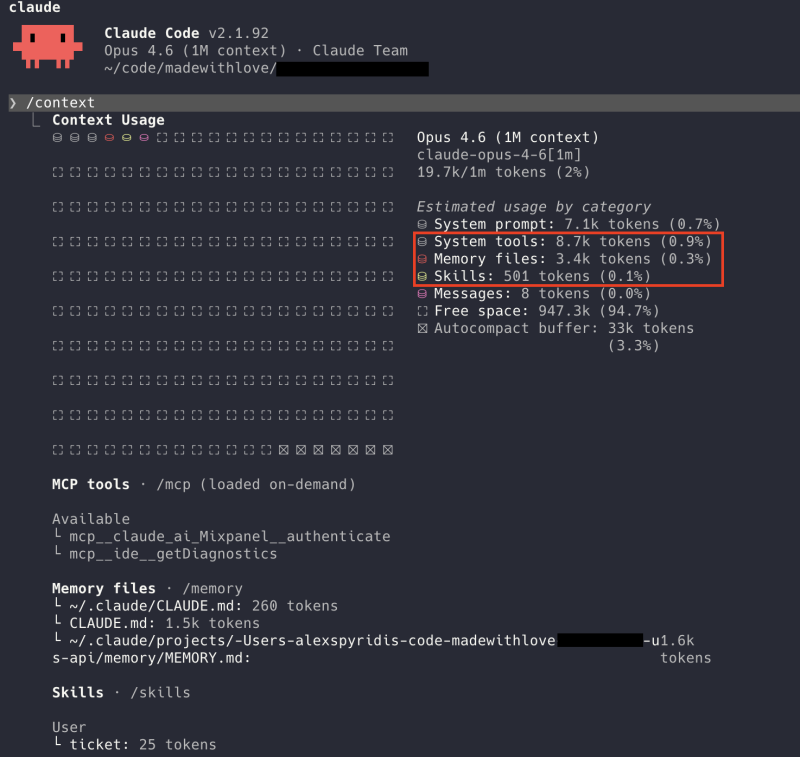
/contextis like the battery usage screen on your phone, but for tokens. It breaks down exactly what's consuming your context: your conversation, plugins, project files, everything. Run it, and you'll immediately see what's eating the most. The example below is a fairly lightweight setup, adding only around 12–13K tokens of overhead. Yours might look very different.
/insightsgives you personalised suggestions on what to optimise based on your current setup. Open the report using the provided link and make the necessary changes.

If you want something more advanced, Claude Code Usage Monitor is a free open-source tool that tracks your usage over time and even predicts when you'll hit your limit. Like a fuel gauge for your AI budget.
The silent killer: plugins you're not using
This is the single biggest thing most people don't realise.
Every plugin (MCP server) you have connected, such as GitHub, Slack, Jira, or Sentry, sends its full list of capabilities into every conversation, even if you never ask it to do anything. It's like carrying a toolbox with 50 tools to change a lightbulb. You only need a screwdriver, but you're paying to carry the whole box.
How bad is it? According to Anthropic's own engineering team, having just five plugins connected can consume around 55,000 tokens before you even type your first message.
To understand what that means: your context window is the total amount of information Claude can hold in a single conversation. Think of it as Claude's working memory. Depending on your plan and model, that's either 200K or 1M tokens. You can see yours by running /context.
On a standard 200K window, 55,000 tokens of plugin overhead means over a quarter of Claude's working memory is taken up before you even start. Some setups are even worse, burning through 134,000 tokens in plugin overhead alone, which is two-thirds of that space gone.

My engineering team is not using AI
Our codebase is too complex for AI.
And since these definitions are sent with every message, they add up fast. At API rates using Opus 4 ($15 per million input tokens), a setup with 134,000 tokens incurs an estimated $2 per message in overhead costs just for plugin definitions. Over a typical 20-message conversation, that's roughly $40 wasted on tools you never even used.
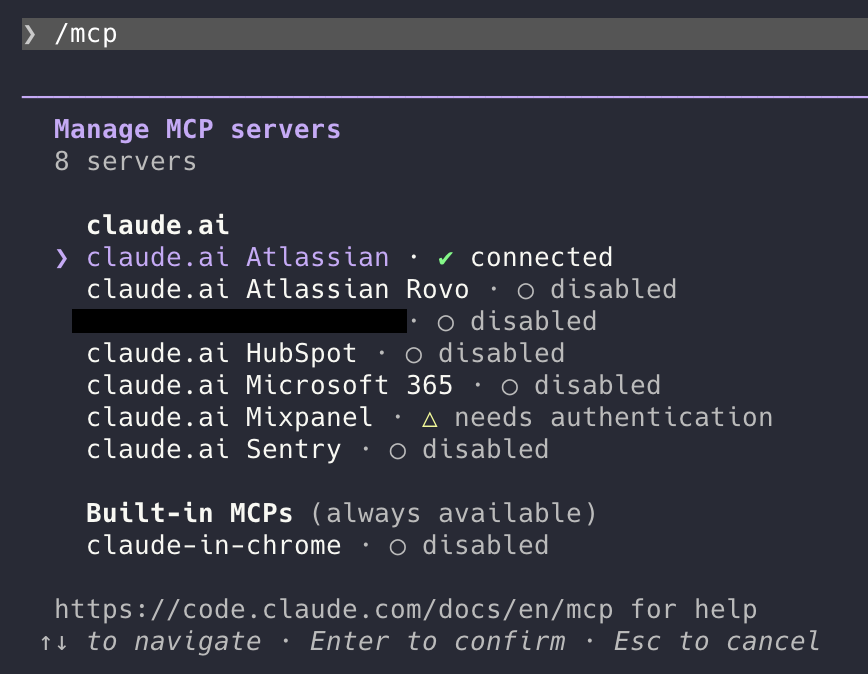
Disable the plugins you don't need for what you're working on right now. You can always re-enable them when you need them. Type /mcp to see all your connected servers and toggle them on or off. Disabled means zero token cost. Servers that need authentication likely consume very little, but disabling them entirely is the safest bet.
More quick wins
Clear your conversation between tasks. Type /clear when you switch topics or finish a task. Long conversations accumulate context fast, especially with the updated 1M token window, and starting fresh is free.
Use profiles. Create a lightweight profile with no plugins for everyday tasks and a full profile for when you actually need the integrations. It's like having different tool belts for different jobs. You can set this up with shell aliases that point to different config directories, so switching is as easy as typing claude-light or claude-full. We covered how to set up aliases like this in our post on running multiple Claude accounts without logging out.
Trim your CLAUDE.md. If you use a project instructions file, remember that it gets loaded into every single conversation. If it's bloated with outdated notes, you're paying for that overhead every time.
Be specific in your prompts. "Fix the bug in auth.py on line 42" burns far fewer tokens than "something seems broken with login." Clarity is kindness, whether you're on a first date, briefing a colleague, or talking to your favourite AI. Vague instructions mean more exploring, more tool calls, and more tokens spent figuring out what you actually meant.
The cheat sheet
- Enable
/statuslinefor always-on cost and context tracking - Run
/contextto see what's eating your tokens - Run
/insightsfor optimisation tips for your specific setup and usage - Disable unused plugins: the single biggest win
/clearbetween tasks- Create light vs. heavy profiles
- Keep your CLAUDE.md lean
- Write specific prompts
For the technical deep dive on why plugins consume so much and how Anthropic is solving it, check out their engineering posts on advanced tool use and code execution with MCP.
What it looks like from the other side of the cap
Once you have squeezed every token out of context, the next constraint is the rate-limit reset clock. A diary of what working against it actually feels like.
Read: your limit will reset at 12pmThe end of the all-you-can-eat AI buffet
Why per-token pricing is about to reshape how teams plan their AI spend.
Read the take


