> ## Content Index
> Fetch the complete content index at: https://madewithlove.com/blog/llms.txt
> Use this file to discover other available public pages before exploring further.
# Cookie-based authentication with Laravel Sanctum
- URL: https://madewithlove.com/blog/cookie-based-authentication-with-laravel-sanctum/
- Published: 2024-06-26T10:36:27.000Z
- Updated: 2026-06-24T08:06:19.000Z
- Description: This is a detailed step-by-step guide for setting up Laravel Sanctum with cookie-based authentication. It explains the logic behind each step and how to set up Postman. We also tackle the most common CORs issues.
- Author: Roduan Kareem Aldeen
- Tags: Engineering, Processes, Tooling, Tutorials, JavaScript, Laravel, Frontend, Security
## The story
I was browsing YouTube a while ago, and this video popped into my face.
Storing Auth Tokens in localStorage is a big mistake
The video's message was simple and straightforward: "**DON'T STORE AUTH TOKENS IN LOCALSTORAGE**", and it stuck hard in my mind.
A while later, I was about to implement authentication in a new personal project, and guess what did my subconscious immediately start yelling? Yes, you're right; the same message from the video: **DON'T STORE AUTH TOKENS IN LOCALSTORAGE**.
Without further ado, I started checking the [documentation](https://laravel.com/docs/11.x/sanctum), thinking it would be a quick and easy 15/30-minute task. I couldn't be more wrong, as I encountered many issues that took me hours to resolve and understand the logic behind the scenes.
- CORS
- `PreflightWildcardOriginNotAllowed`
- `PreflightAllowedOriginMismatch`
- `PreflightInvalidAllowCredentials`
- "Session not set on request"
- 401 - Unauthenticated errors (although I've just logged in)
- Setting up postman
In this article, you (and my future self) will find a detailed step-by-step guide on how to set up Laravel Sanctum with cookie-based authentication, explaining the logic behind each step.
our bi-weekly show
[](https://open.spotify.com/show/4IcBDfZ0n0I00Ek1jc6TsK?si=65d3167035bf433d)
Follow our bi-weekly insights on Spotify: where Dimitri and Andreas discuss what they're seeing at SaaS teams and trends they're watching closely.
[Listen on Spotify ](https://open.spotify.com/show/4IcBDfZ0n0I00Ek1jc6TsK?si=65d3167035bf433d)
## Cookie-based authentication explained
### Why use it
Long story short, It's more secure as JavaScript can't access `httponly` cookies, which is the case for the `laravel_session` cookie by default. you can watch the video in [the story](#the-story) section above for more details.
### How does it work
When the browser first requests, the server will create a session and send its ID to the browser using a cookie usually, it's `{APP_NAME_FROM_ENV_FILE}_session`, usually, it's `laravel_session` if you haven't updated `APP_NAME` in your environment file `.env`.
## Getting our hands dirty
### Setting up a fresh project
```bash
laravel new sanctum-cookie
```
### Installing Laravel Sanctum
If you're using Laravel 10 or below (*skip this one if you're on Laravel 11*):
```bash
composer require laravel/sanctum
php artisan vendor:publish --provider="Laravel\Sanctum\SanctumServiceProvider"
php artisan migrate
```
Next, let's add Sanctum's middleware to the `api` middleware group.
```php
'api' => [
\Laravel\Sanctum\Http\Middleware\EnsureFrontendRequestsAreStateful::class,
\Illuminate\Routing\Middleware\ThrottleRequests::class.':api',
\Illuminate\Routing\Middleware\SubstituteBindings::class,
],
```
**For Laravel 11 users**, you just need to run this one command, and it's going to do everything for you:
```bash
php artisan install:api
```
For the middleware setup, we just need to invoke the `statefulApi` middleware method in the application's `bootstrap/app.php` file:
```php
->withMiddleware(function (Middleware $middleware) {
$middleware->statefulApi();
})
```
One last thing! by default, Sanctum will register a route for the CSRF token, which is going to be `/sanctum/csrf-token`. but since we'll be using an SPA and probably frontend developers will set a base URL of `/api` then Sanctum's URL won't work right away, and to fix that, we'll **add** a new key in `config/sanctum.php` to fix this
```php
/*
|--------------------------------------------------------------------------
| Sanctum Route prefix
|--------------------------------------------------------------------------
|
*/
'prefix' => 'api',
```
now, the path will become `/api/csrf-token` and the front-end developer will be satisfied with removing one thing off his shoulder.
We're done here!
### Configure your frontend domain
**TLDR;** Add a new variable to .env `SANCTUM_STATEFUL_DOMAINS={YOUR_FRONTEND_URLS_COMMA_SEPARATED}` for example, if your frontend app will be served from `localhost:5173` for local development and `frontend.madewithlove.com` for production, then the resulting variable will be
```env
SANCTUM_STATEFUL_DOMAINS=localhost:5173,frontend.madewithlove.com
```
**Bonus tip:** Remember to update `.env.example` as `.env` is ignored in version control, and since `.env.example` will be used in creating `.env` when the project is cloned again by another developer or the DevOps when deploying the project.
**Bonus tip #2:** You should **NOT** include the scheme (`http://` or `https://`) or a trailing slash `/`. you should only add the host (the domain or the IP) and the port (if it exists).
**Bonus tip #3: The front end and the API must live under the same top-level domain.** which means if the frontend is served from `madewithlove.com` then the API must be on the same domain or on a subdomain.
**Bonus tip #4:** `SESSION_DOMAIN` variable determines the domain and subdomains to which the session cookie is available. By default, the cookie will be available to the top-level domain and all subdomains.
**Explanation**
First, ask the important question: *Why must I configure the frontend domain?* Because the middleware we enabled while installing Sanctum *won't* authenticate the session unless the request comes from the domain(s) we configured. This is done to protect the application from being accessed from outside. For more details, you can check the [EnsureFrontendRequestsAreStateful class](https://github.com/laravel/sanctum/blob/4.x/src/Http/Middleware/EnsureFrontendRequestsAreStateful.php#L84).
If we look at the `stateful` key in `config/sanctum.php`, we notice that `stateful` key takes its value from `SANCTUM_STATEFUL_DOMAINS` environment variable, and if it's not set, It will fall back to localhost and its aliases in addition to the domain from `APP_URL`.
### Implementing login endpoint
Since we have everything in place, let's implement the `/login` route. you can define this route however you like. For my case, I'll use the implementation mentioned in the official [Laravel documentation](https://laravel.com/docs/11.x/authentication#authenticating-users) in this way, you'll be able to customize it however you want. If you want to use any starter kit like Breeze, you'll be able to do the same thing since I'm betting that this article will help you understand what's under the hood so you can juggle authentication easily.
```bash
php artisan make:controller Api/Auth/Spa/LoginController --invokable
```
```php
// LoginController
namespace App\Http\Controllers\Api\Auth\Spa;
use App\Http\Controllers\Controller;
use Illuminate\Http\Request;
use Illuminate\Support\Facades\Auth;
use Illuminate\Validation\ValidationException;
class LoginController extends Controller
{
public function __invoke(Request $request)
{
$credentials = $request->validate([
'email' => ['required', 'email'],
'password' => ['required'],
]);
if (Auth::attempt($credentials)) {
$request->session()->regenerate();
return response()->json(['message' => __('Welcome!')]);
}
throw ValidationException::withMessages([
'email' => __('The provided credentials do not match our records.'),
]);
}
}
```
Nothing fancy here; just using the `Auth::attempt` method to authenticate the user.
Of course, we need to define the login route. I'll prefix auth routes with `auth/spa` just in case we need to implement authentication routes for a mobile app in the future; you can define another set of routes for it under `auth/app`.
```php
// routes/api.php
use App\Http\Controllers\Api\Auth\Spa\LoginController;
Route::prefix('auth/spa')->group(function (){
Route::post('login', LoginController::class)->middleware('guest');
});
```
### Create test user
We need to have one user in the database to try out our new login endpoint. There are many ways to create one, so feel free to do it however you like. For the purpose of this tutorial, I'll just run the default seeder which contains the code to generate one test user
```php
create();
User::factory()->create([
'name' => 'Test User',
'email' => 'test@example.com',
]);
}
}
```
**Note**: The code is commented by default in Laravel 10, so make sure to uncomment it before running the command.
```bash
php artisan db:seed
```
### Setting up a Postman collection
First, let's start simple and just try the login endpoint we created earlier and see the result
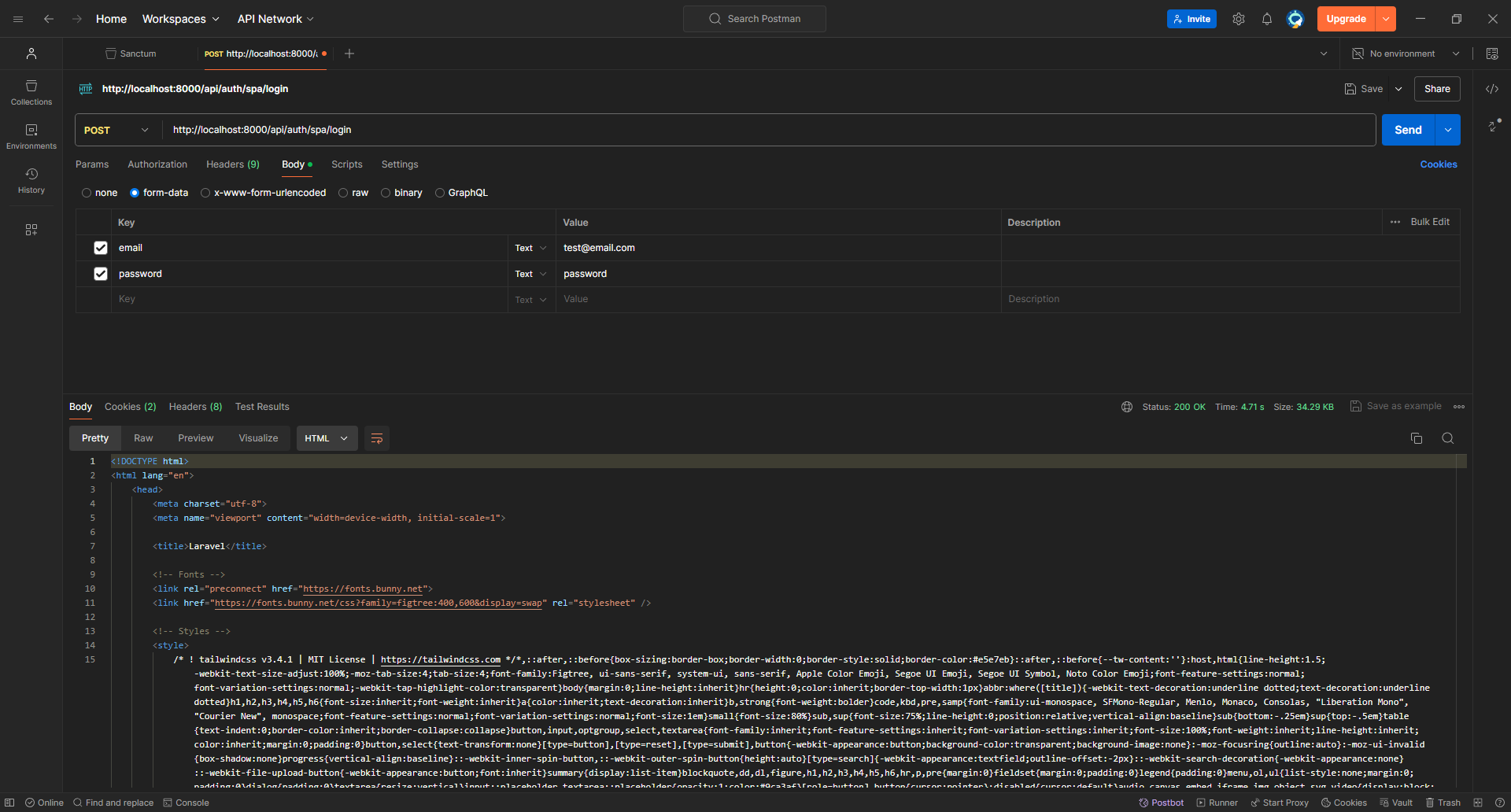
Well, things didn't end up as we wanted; first, we got `500 Internal Server Error` and also, the response was returned in `HTML`, not `JSON`.
Fixing the second issue is easy, as we need to inform Laravel to return the response in `JSON` format; we can do that using the `Accept` header we'll set to `application/json`.
Moving back to the first issue, you can see from the first line of the comment, that it says `ReuntimeException: Session store not set on request.`.
If we were to google this error we would find various answers depending on the context. This error happens simply because the `StartSession` middleware wasn't executed on this request and is usually applied only to `web` routes by default. You'll see answers suggesting moving the route to the `web.php` file or adding the web middleware to the route. **However,** we already did something earlier when setting Sanctum up which is adding its middleware to the `api` route group, and that middleware is responsible for executing `StartSession` but why did it not work?
That's because if we were to inspect the code of `EnsureFrontendRequestsAreStateful` (Sanctum's middleware) we immediately notice that it doesn't do anything **UNLESS** the `referer` or `origin` header exists **AND** its value is included in the `sanctum.stateful` config key, which is covered in detail above 👆🏻.
```php
class EnsureFrontendRequestsAreStateful
{
public function handle($request, $next)
{
$this->configureSecureCookieSessions();
return (new Pipeline(app()))->send($request)->through(
static::fromFrontend($request) ? $this->frontendMiddleware() : [] // 👈🏻👈🏻👈🏻
)->then(function ($request) use ($next) {
return $next($request);
});
}
// ...
public static function fromFrontend($request)
{
$domain = $request->headers->get('referer') ?: $request->headers->get('origin'); // 👈🏻👈🏻👈🏻
if (is_null($domain)) {
return false; // 👈🏻👈🏻👈🏻
}
$domain = Str::replaceFirst('https://', '', $domain);
$domain = Str::replaceFirst('http://', '', $domain);
$domain = Str::endsWith($domain, '/') ? $domain : "{$domain}/";
$stateful = array_filter(config('sanctum.stateful', []));
return Str::is(Collection::make($stateful)->map(function ($uri) {
return trim($uri).'/*';
})->all(), $domain); // 👈🏻👈🏻👈🏻
}
}
```
And with this riddle demystified we know what to do next
- set `Accept` header to `application/json`
- set `Referer` header to `localhost:5173`
Let's run it and see how it goes now
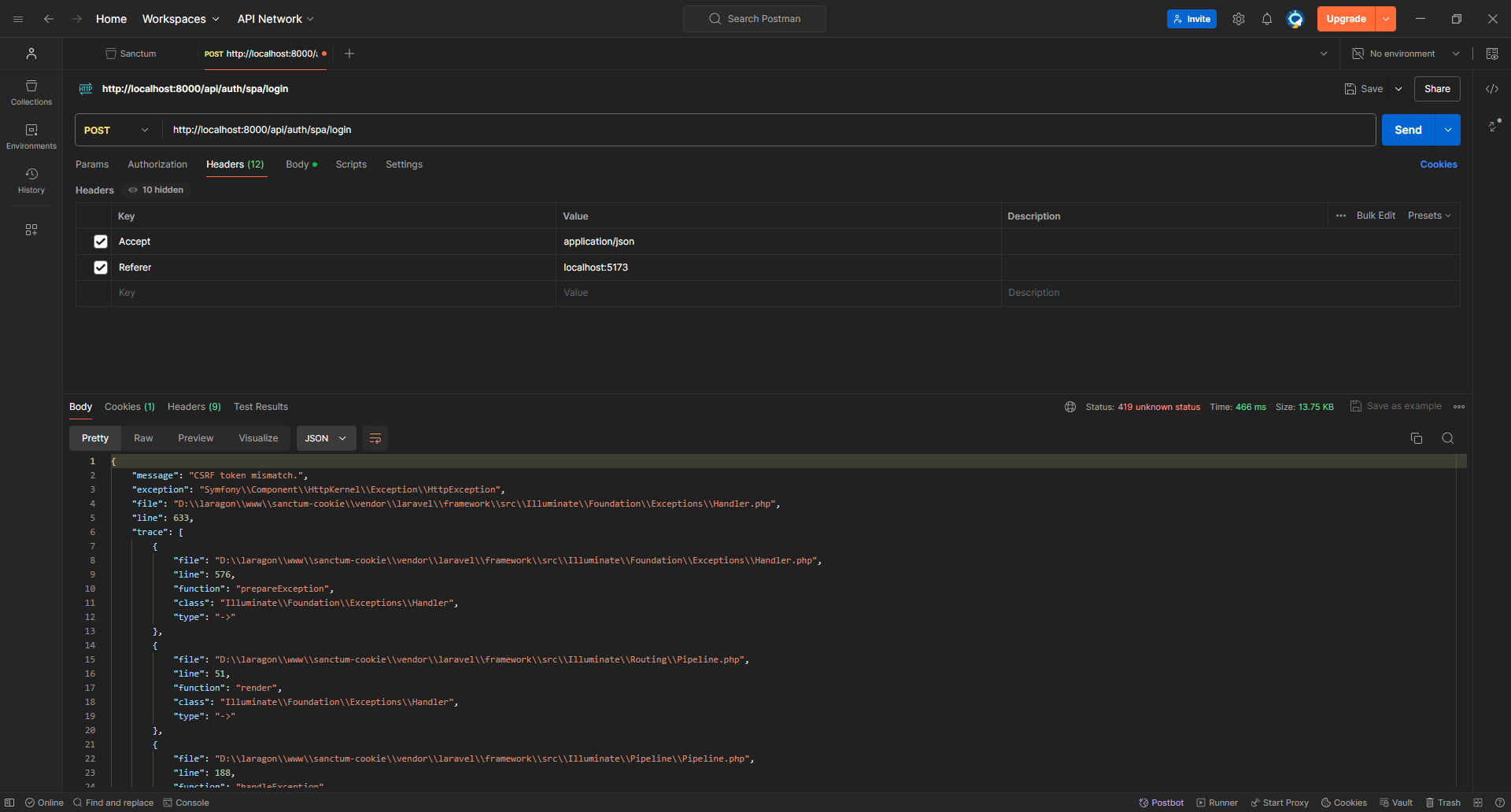
There's a new error, which means we're progressing here. What's the CSRF token, and why is it a problem if it is mismatched?
To answer this question, I'll just leave Jeffery Way to explain what's going on
So, we need to make a `GET` request to `/api/csrf-token` to receive a `XSRF-TOKEN` cookie then include in the login request as `X-XSRF-TOKEN`.
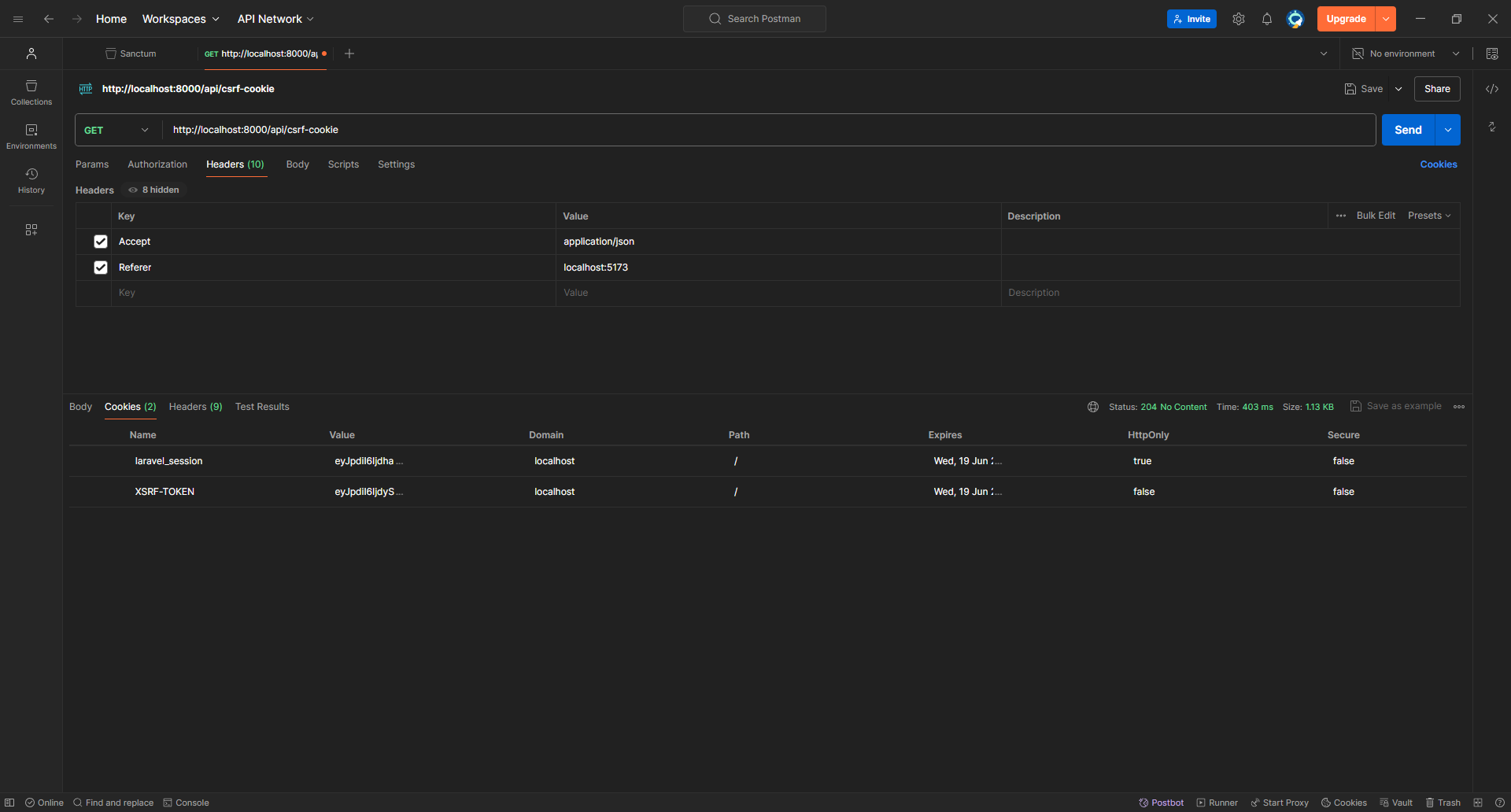
As you can see, we received the cookie. We'll copy its value to the login request and try again!
**Note**
There is an extra `%3D` at the end of the cookie's value, I'm not sure why it appears but it's probably a bug in Postman
`eyJpdiI6ImdZb0s4eHQ2MERhOGM5VU0yMVhxUlE9PSIsInZhbHVlIjoiUnJpU2VHVVB2VnE2TEJ4YWMyczJKVnZJNEtzemJvZTg2SDlvSERxREtmKy80T2lpdUFwdE9ZK0lIdkZ6OUhmUUVLWFY2Q24zMEJ3TXdSQnErR0ErRWJuSUNXWHh5M2tYR2svbVlXd3F2RUUvZVpFb1ViNS9ua1FWZUh0akVrcjMiLCJtYWMiOiJhNWY1YTJkMTI0YjNiYzQ0NzM2MWI2M2NhYjRiNjhkYjEwNjljYTA3OWY4NzVhMDNjMmM0YjQ1YjQ5NWQ3NWRlIiwidGFnIjoiIn0%3D`
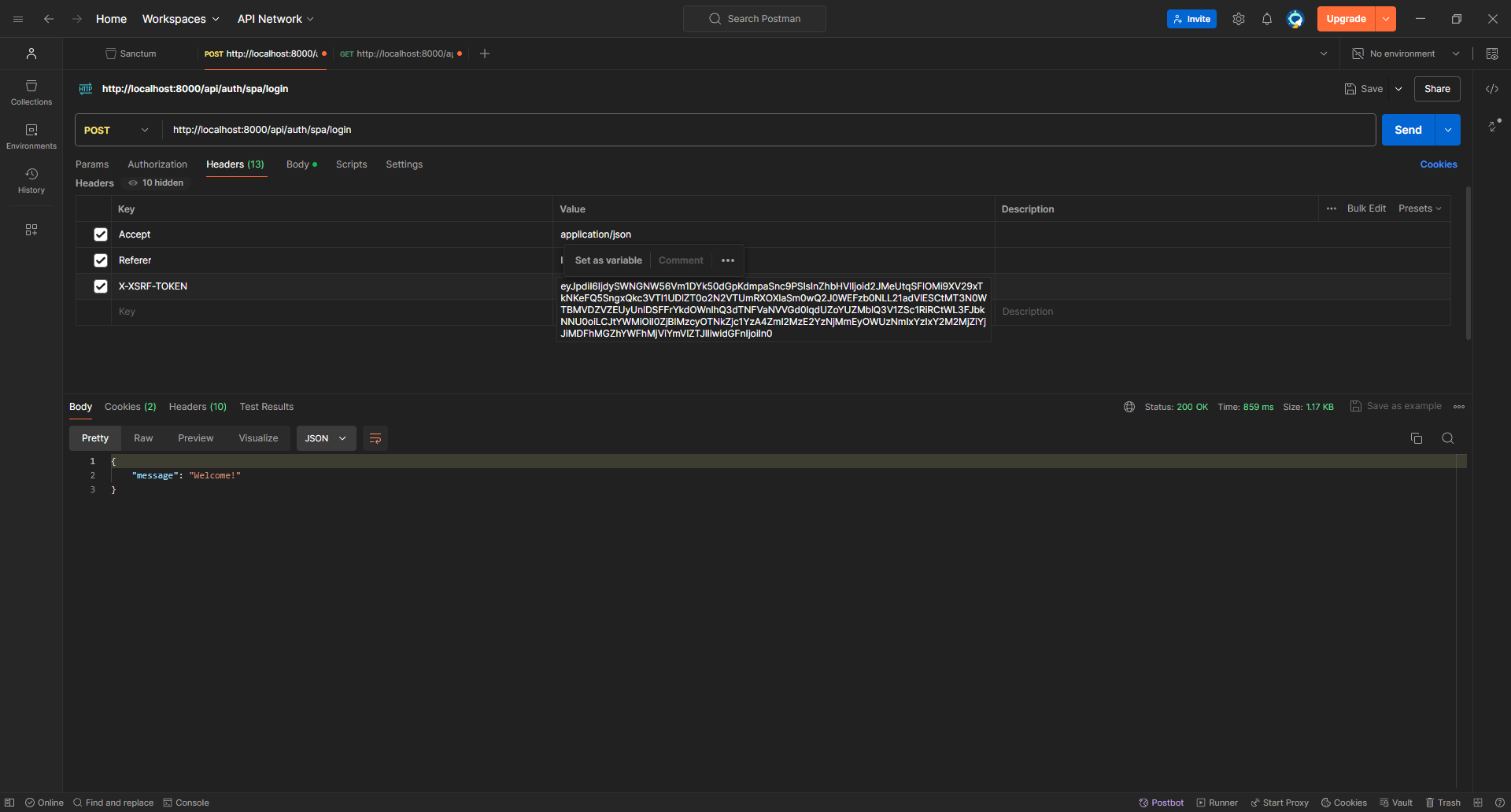
Finally, we are logged in!
Now, let's try to make a `GET` request to `/api/user` which is defined by default in `routes/api.php`
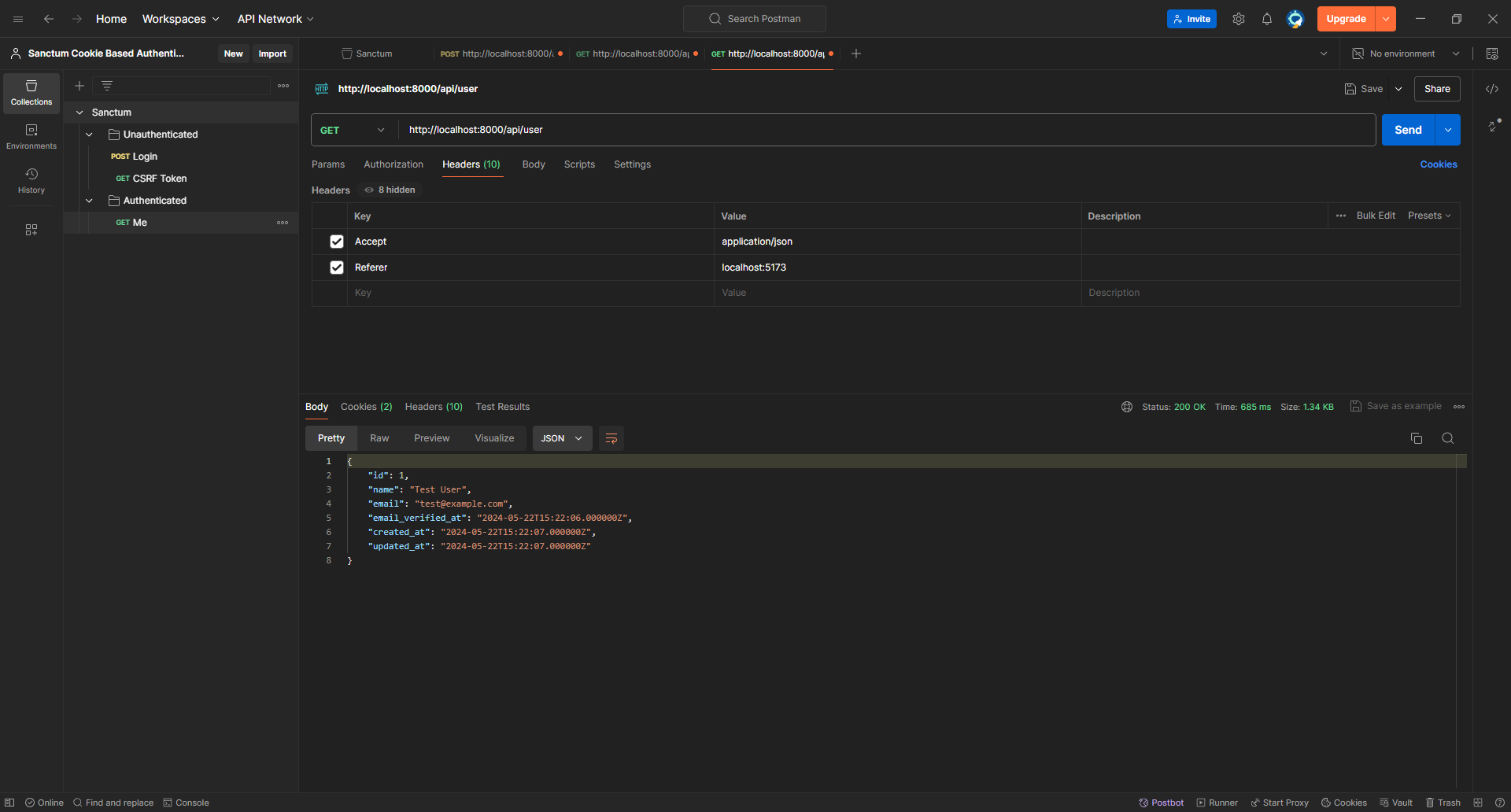
It worked perfectly since Postman keeps track of cookies!
Let's clear the cookies and try again!
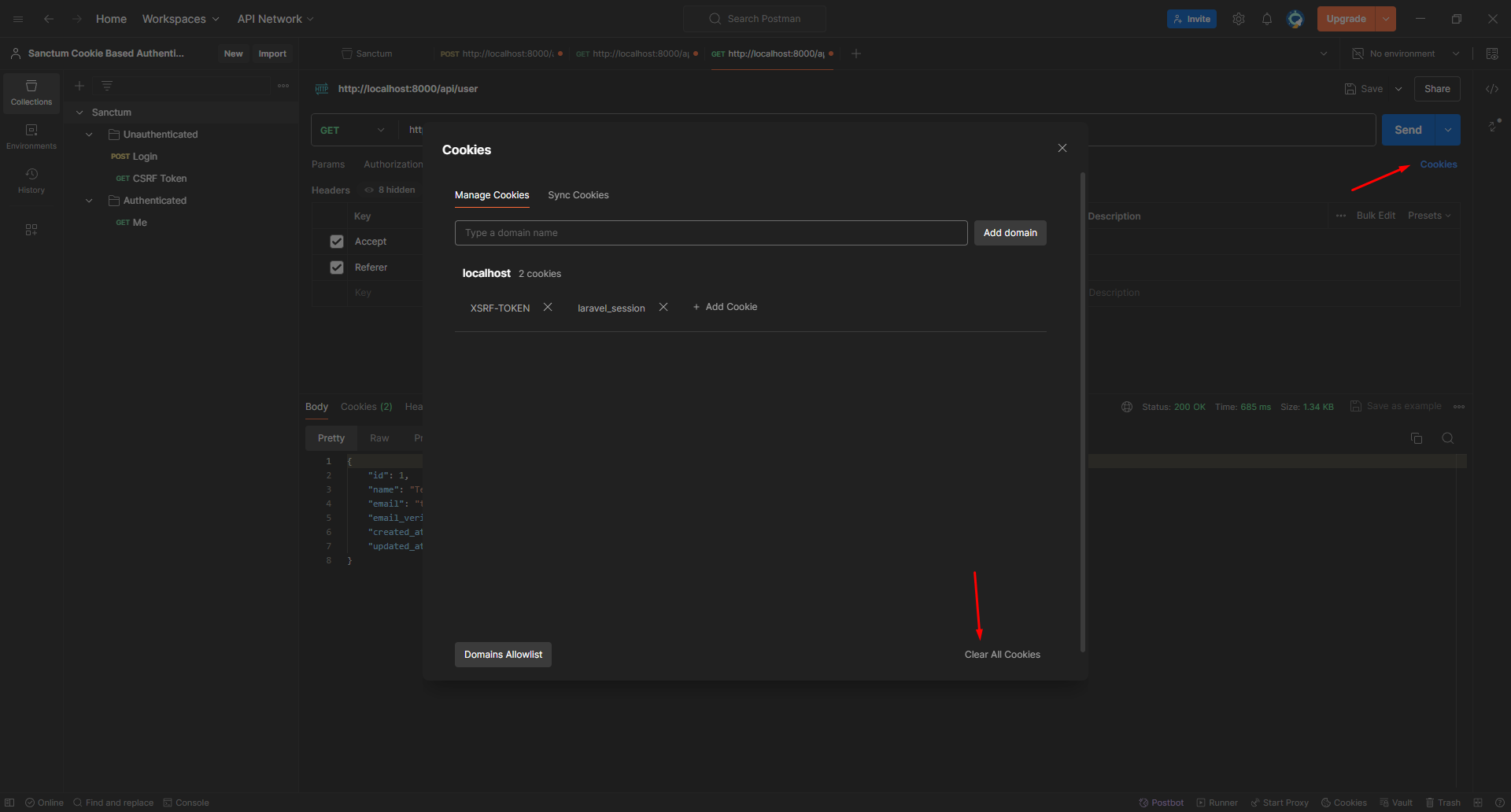
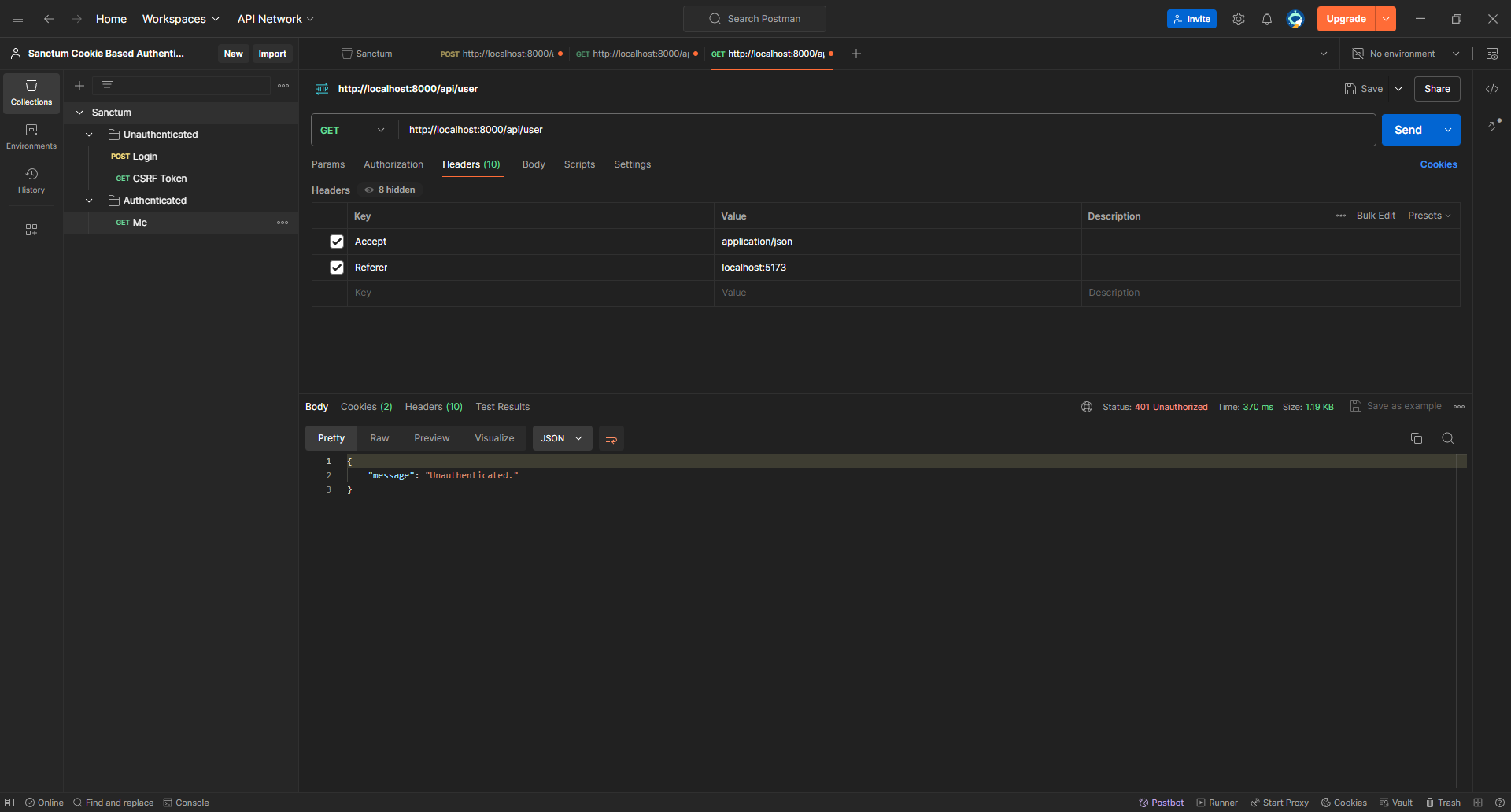
Looks good!
**But** isn't it too much to keep copy-pasting the headers every time and manually calling the `csrf-cookie` endpoint to get the `XSRF-TOKEN` cookie?
Yeah, that's a lot, but you'll get used to it.
No, I was kidding. To automate the whole process, we just need to write some Postman scripts that will accomplish the following
- By default, add `Accept`, and `Referer` headers for each request
- Get the CSRF token before sending `post` requests
- Add `XSRF-TOKEN` header only to `POST` requests.
But first, let's create some variables to make it easier to make new requests
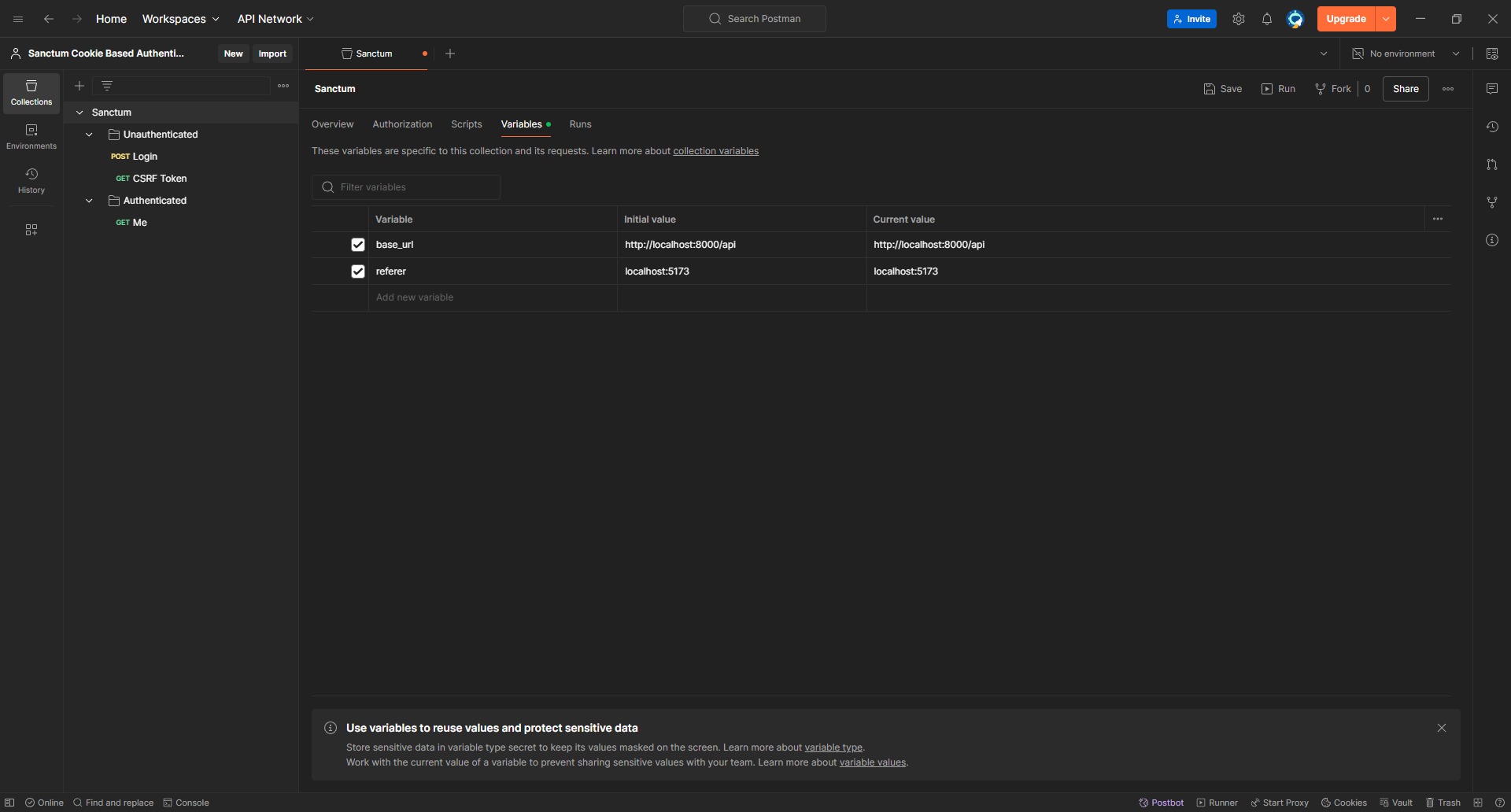
We can use the `base_url` to update the URLs of the requests we created.
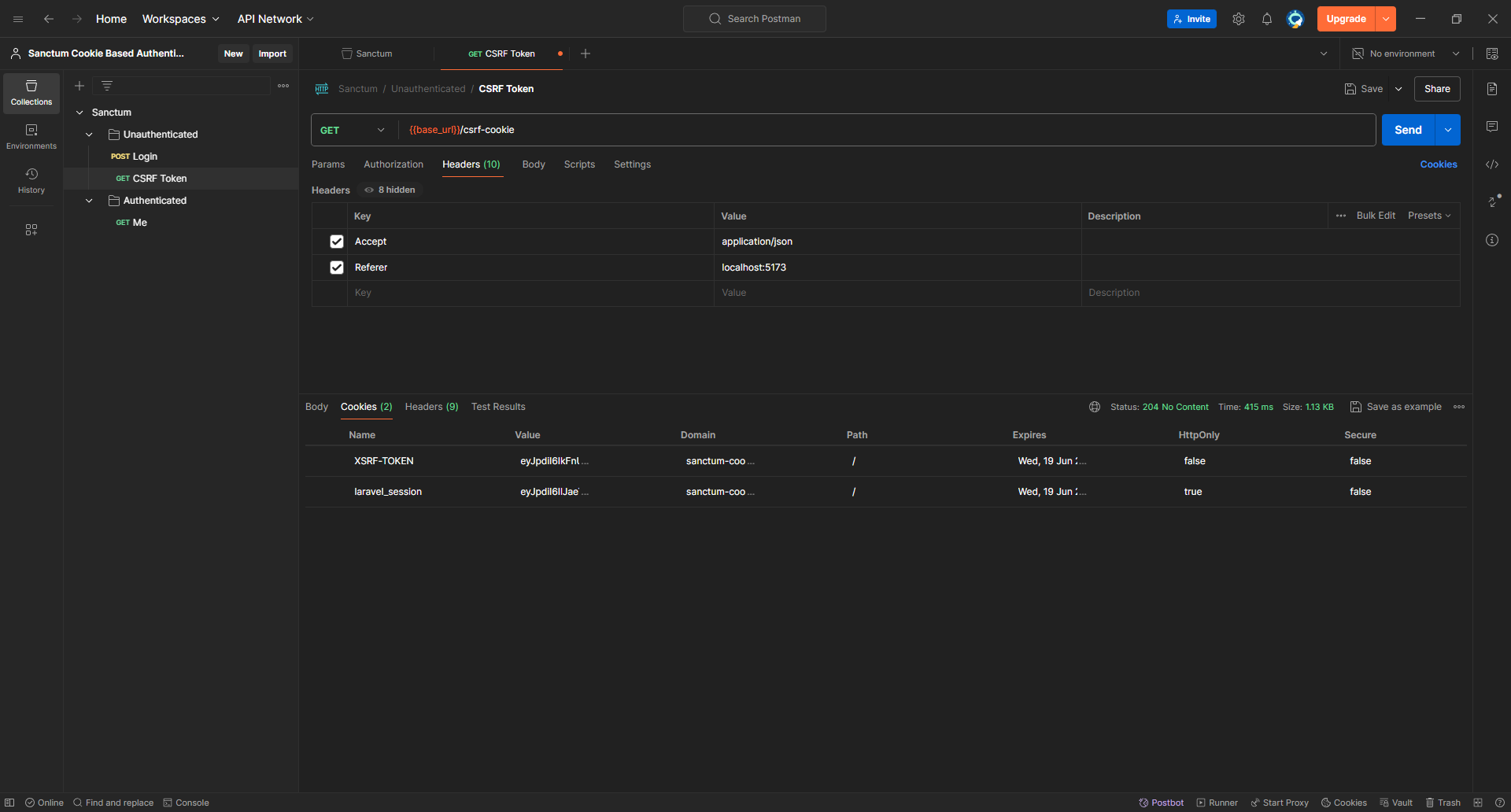
and it still works.
It's time to write some code now we'll add the following code as a `Pre-request` script in our collection
```javascript
pm.request.headers.add({key: 'accept', value: 'application/json' })
pm.request.headers.add({key: 'referer', value: pm.collectionVariables.get('referer')})
if (pm.request.method.toLowerCase() !== 'get') {
const baseUrl = pm.collectionVariables.get('base_url')
pm.sendRequest({
url: `${baseUrl}/csrf-cookie`,
method: 'GET'
}, function (error, response, {cookies}) {
if (!error) {
pm.request.headers.add({key: 'X-XSRF-TOKEN', value: cookies.get('XSRF-TOKEN')})
}
})
}
```

Double-click for Image Properties
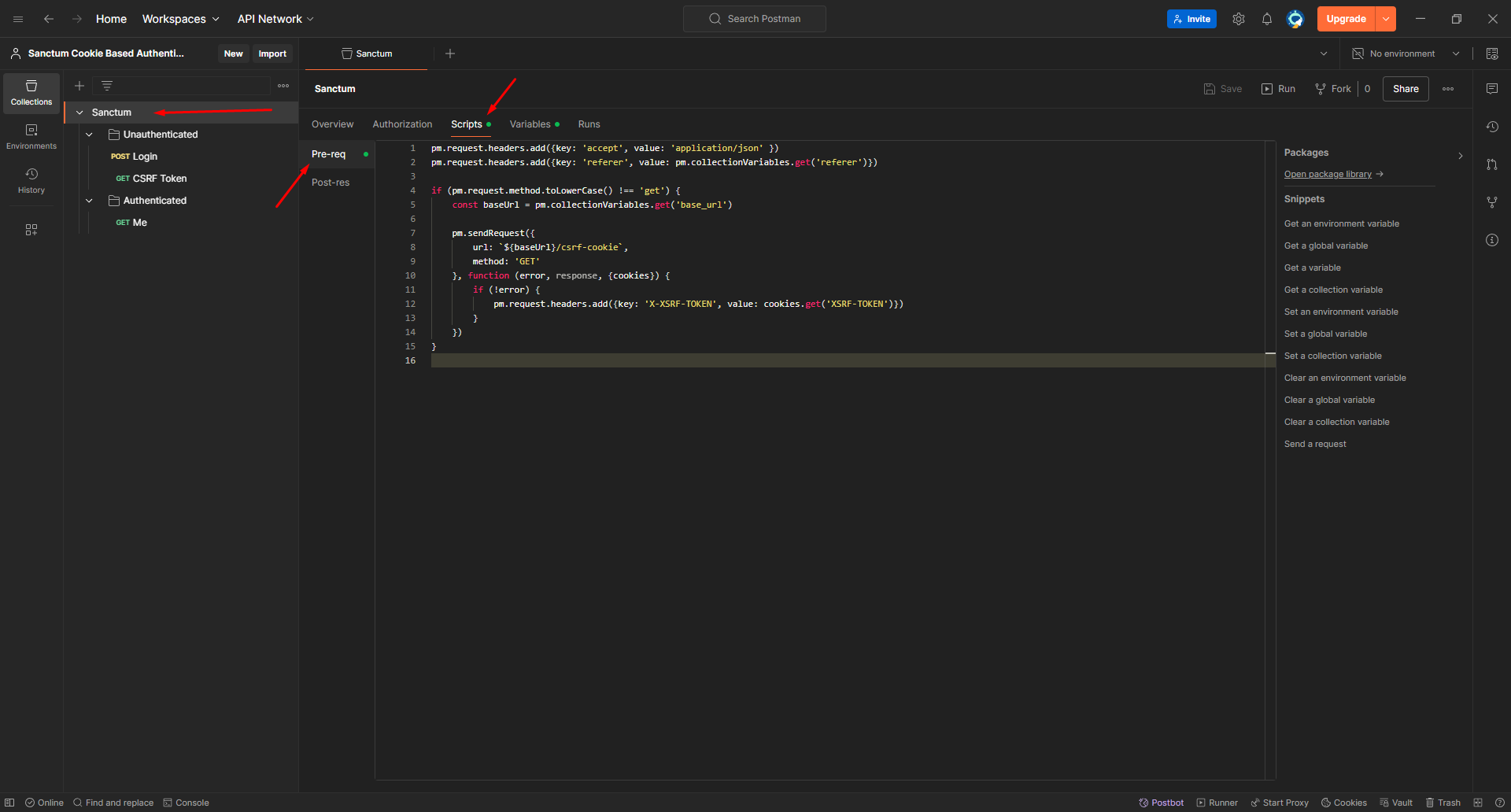
Now we can remove the headers we added manually to the login request and try again
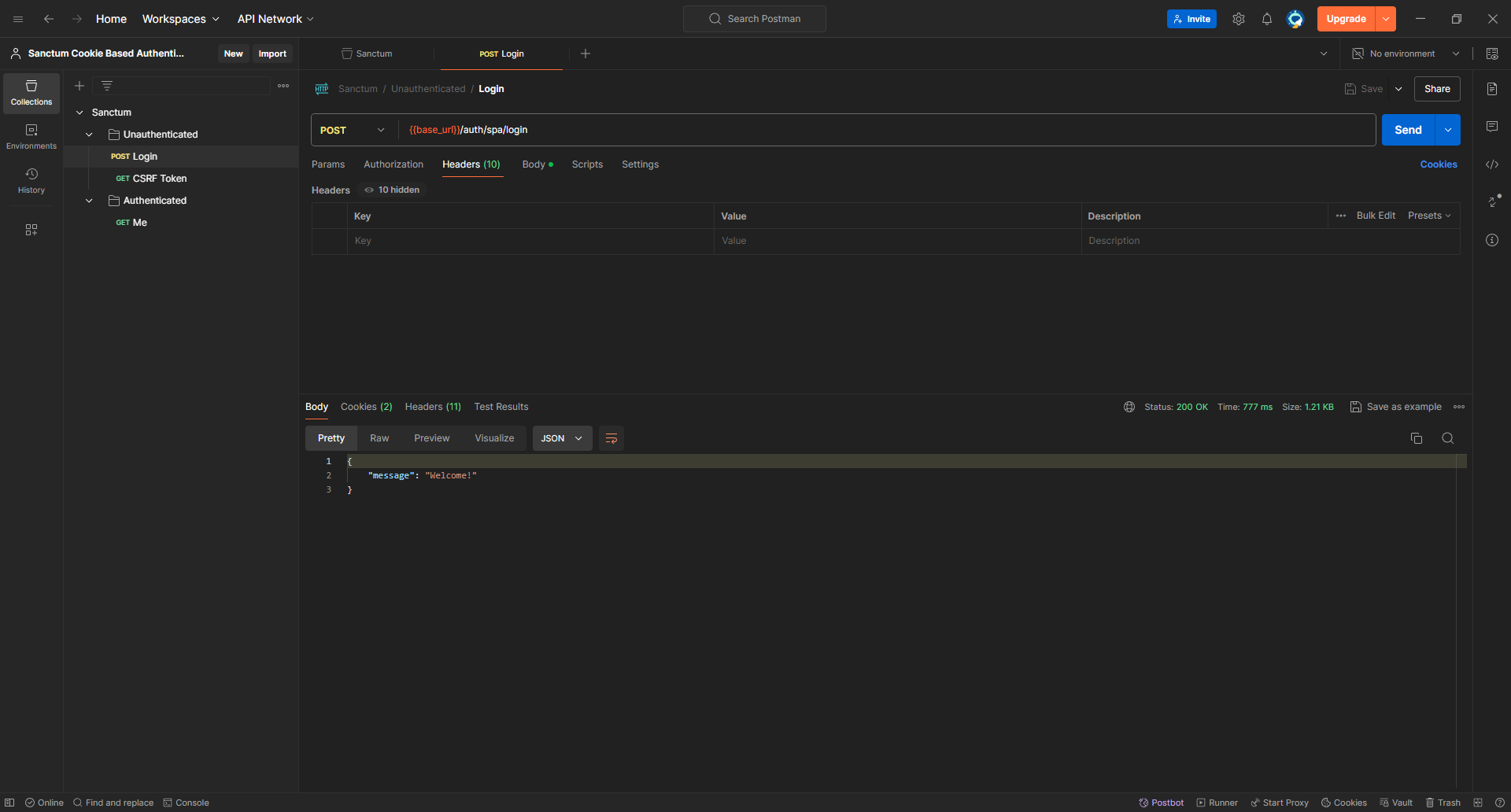
and we are good to go!
### Testing our work on the browser
For demonstration purposes, we'll create a minimal Vue 3 application that proves everything works properly.
To create a new Vue app, all we need to do is run `yarn create vue` it will prompt for some configurations; here are my answers if you want to follow along
```
√ Project name: ... sanctum-cookie-front
√ Add TypeScript? ... Yes
√ Add JSX Support? ... No
√ Add Vue Router for Single Page Application development? ... Yes
√ Add Pinia for state management? ... Yes
√ Add Vitest for Unit Testing? ... No
√ Add an End-to-End Testing Solution? » No
√ Add ESLint for code quality? ... Yes
√ Add Prettier for code formatting? ... Yes
√ Add Vue DevTools 7 extension for debugging? (experimental) ... No
Done. Now run:
cd cookie-sanctum
yarn
yarn format
yarn dev
```
Next, let's install the dependencies we need `yarn add axios js-cookies` & `yarn add @types/js-cookies -D`.
Create `src/plugins/axios.ts` with the following content
```javascript
import axiosLib from 'axios'
import Cookies from 'js-cookie'
const axios = axiosLib.create({
baseURL: import.meta.env.VITE_BACKEND_URL,
headers: {
'X-Requested-With': 'XMLHttpRequest',
'Accept': 'application/json',
},
})
axios.defaults.withCredentials = true // allow sending cookies
axios.interceptors.request.use(async (config) => {
if ((config.method as string).toLowerCase() !== 'get') {
await axios.get('/csrf-cookie').then()
config.headers['X-XSRF-TOKEN'] = Cookies.get('XSRF-TOKEN')
}
return config
})
export default axios
```
We need to define the `VITE_BACKEND_URL` variable
```env
VITE_BACKEND_URL=http://localhost:8000/api
```
Last but not least, Update `src/App.vue` file to send the `login` request and print the result, and remember the order of requests is going to be `GET /api/csrf-cookie`, `POST /auth/spa/login`, and `GET /api/user`. and we know what to expect from each one since we have tried them in Postman before.
```vue
```
That's good so far; let's test it in the browser and see!
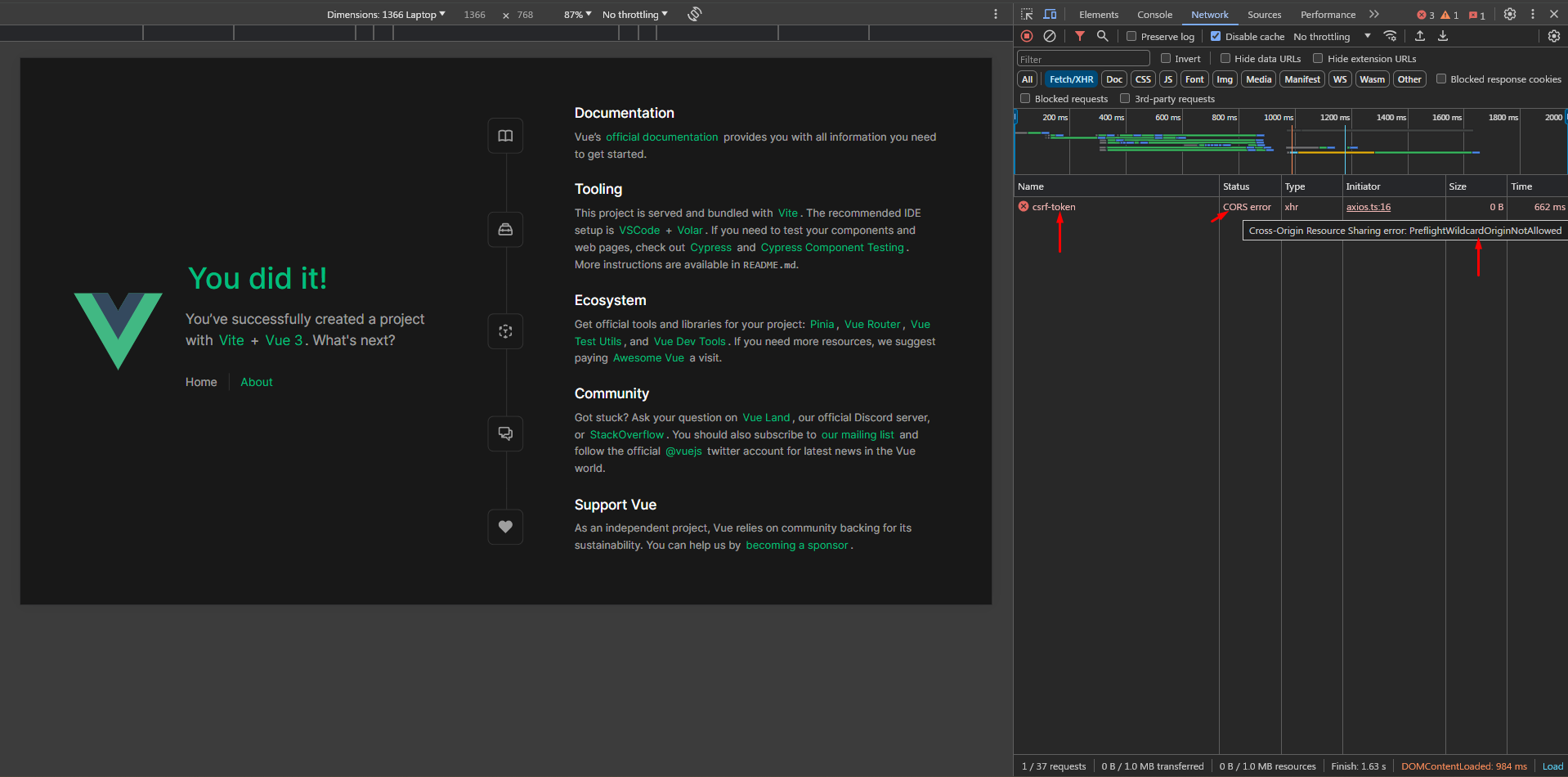
`CORS error`, why did we get it?
Although it's working on Postman, However, the browser's behaviour is a bit different, and here's the full story:
The Vue app is served from `localhost:5173` and it's trying to send a request to `localhost:8000` which is a different `host`; the browser will send a `preflight` request which is responsible for asking the server if the following request (`GET /api/csrf-cookie`) is allowed by the server's CORS settings if it is, then the browser will send the request, and if not, it will throw a `CORS error`.
Now, here's the trick: you should **ALWAYS** hover over the `CORS error` message to get the details and in our case it says `PreflightWildcardOriginNotAllowed` which means that the server has a wildcard `*` as the value of the `Access-Control-Allow-Origin` header. To fix that in Laravel let's try to update the `allowed_origins` key in `config/cors.php` to `[env('SANCTUM_STATEFUL_DOMAINS', '*')]`
```php
return [
// ...
'allowed_origins' => [env('SANCTUM_STATEFUL_DOMAINS', '*')],
// ...
];
```
Let's try again now...
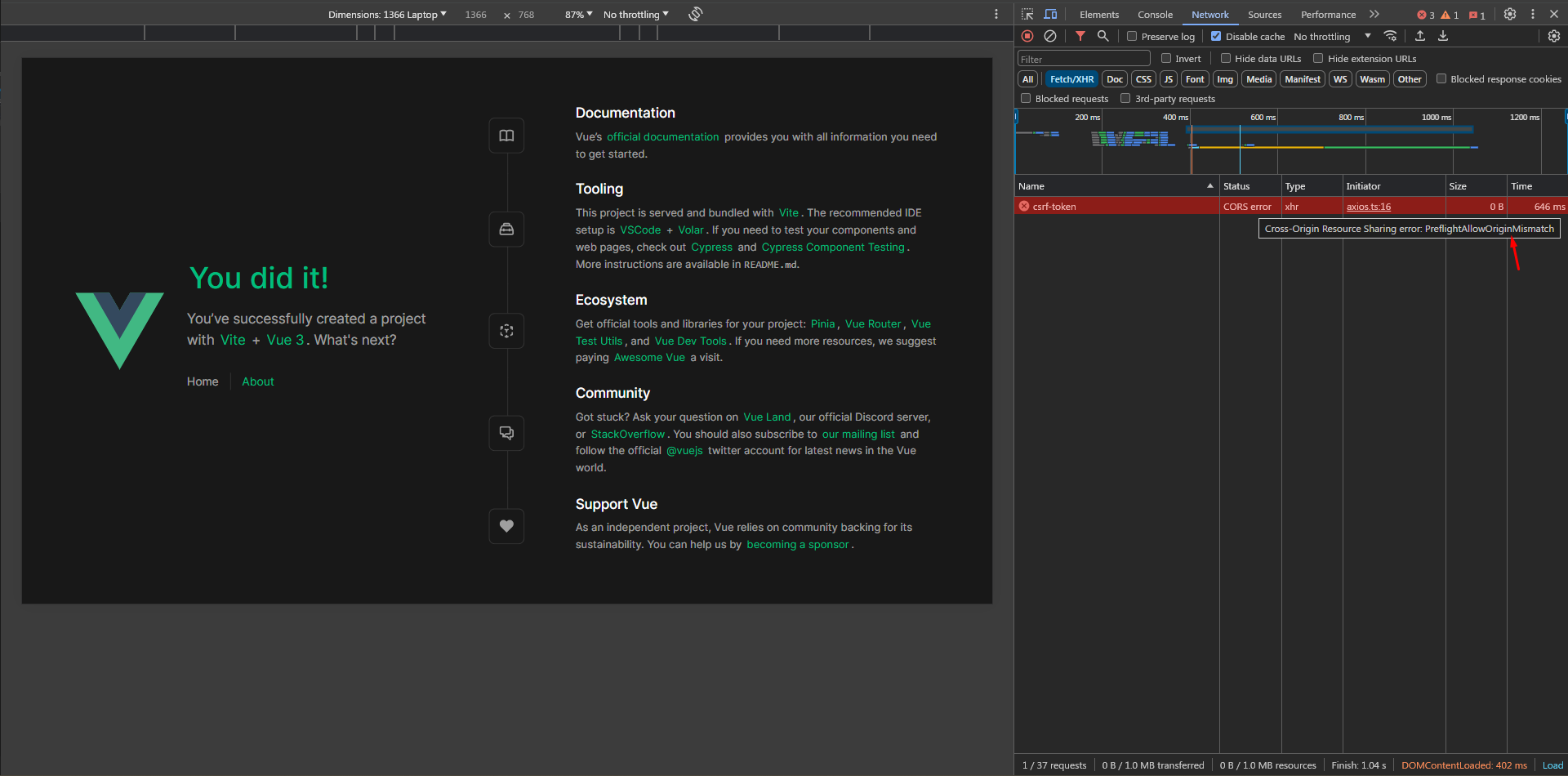
Another `CORS error`, but this time, it's for a different reason `PreflightAllowedOriginMismatch`. This is because if we look `Access-Control-Allow-Origin` [examples](https://developer.mozilla.org/en-US/docs/Web/HTTP/Headers/Access-Control-Allow-Origin#examples) we can see that the origin consists of a scheme (`https://` / `http://`) and host (`localhost:5173` / `madewithlove.com`) which means that `SANCTUM_STATEFUL_URL` value won't work here and we'll introduce another variable `FRONTEND_URL=http://localhost:5173` and add it to `.env` & `.env.example` and update the `config/cors.php` file
```php
return [
// ...
'allowed_origins' => [env('FRONTEND_URL', '*')],
// ...
];
```
Let's try more more time!
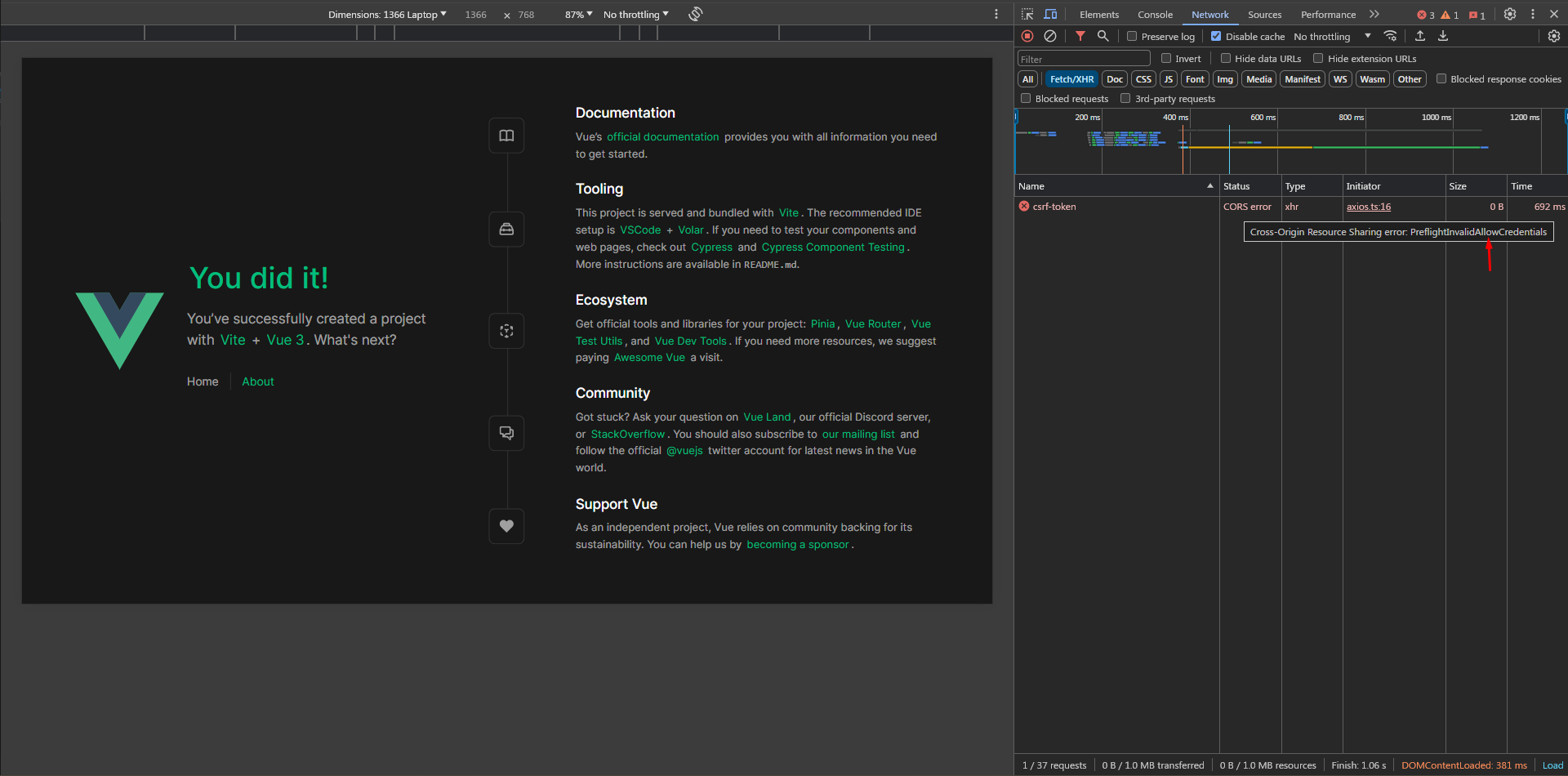
Aha! We still have one last error here `PreflightInvalidAllowCredentials` which requires setting `supports_credentials` to `true` in `config/cors.php`. Which controls the `Access-Control-Allow-Credentials` response header that tells browsers whether the server allows cross-origin HTTP requests to include credentials. Credentials are cookies, or authentication headers containing a username and password (i.e. `Authorization` header).
```php
return [
// ...
'allowed_origins' => [env('FRONTEND_URL', '*')],
// ...
'supports_credentials' => true,
];
```
Let's give it another shot!
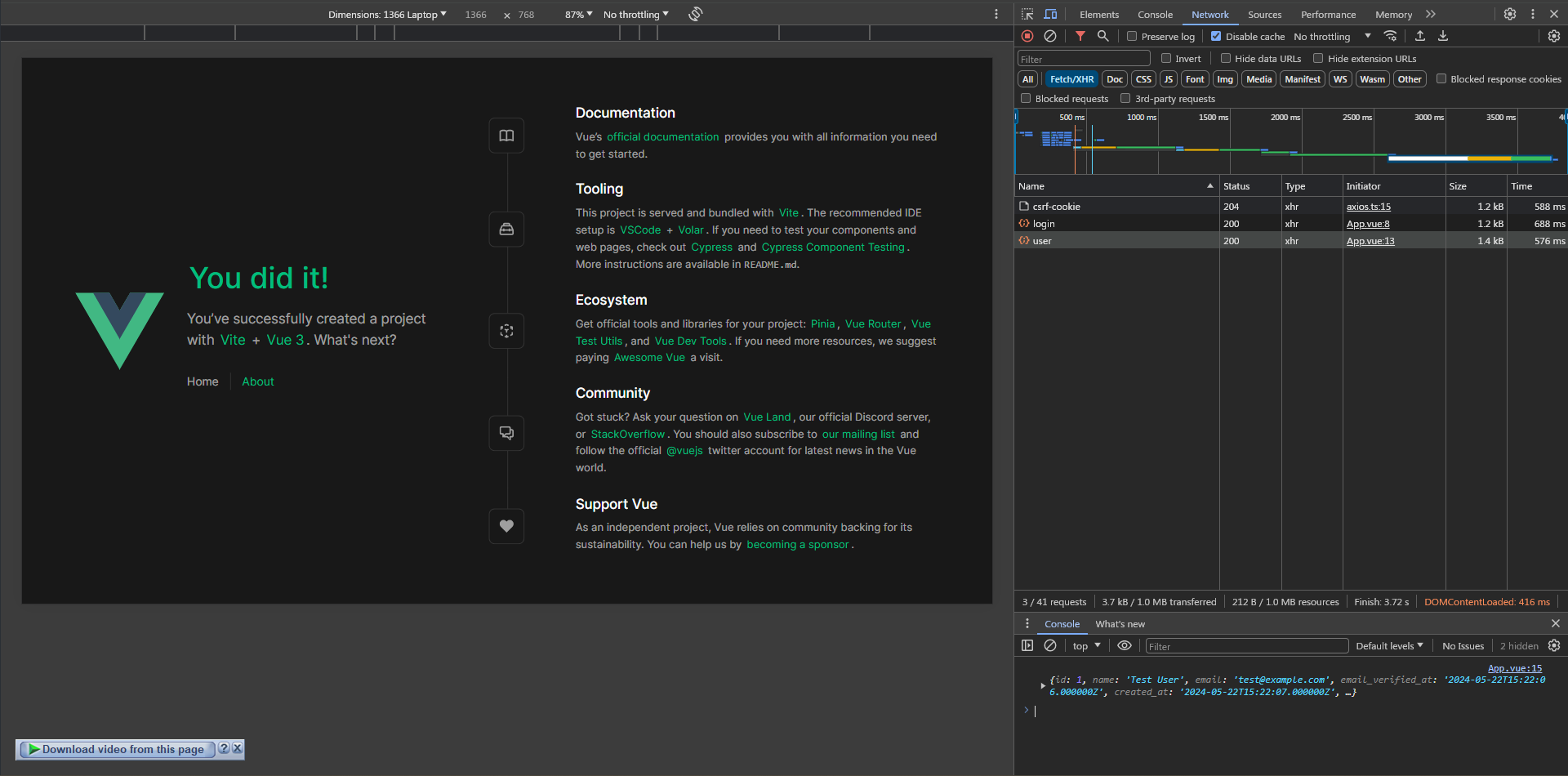
Finally!
What if an authenticated user tried to log in again (by mistake)?
Let's refresh the page here and see what's going to happen ...
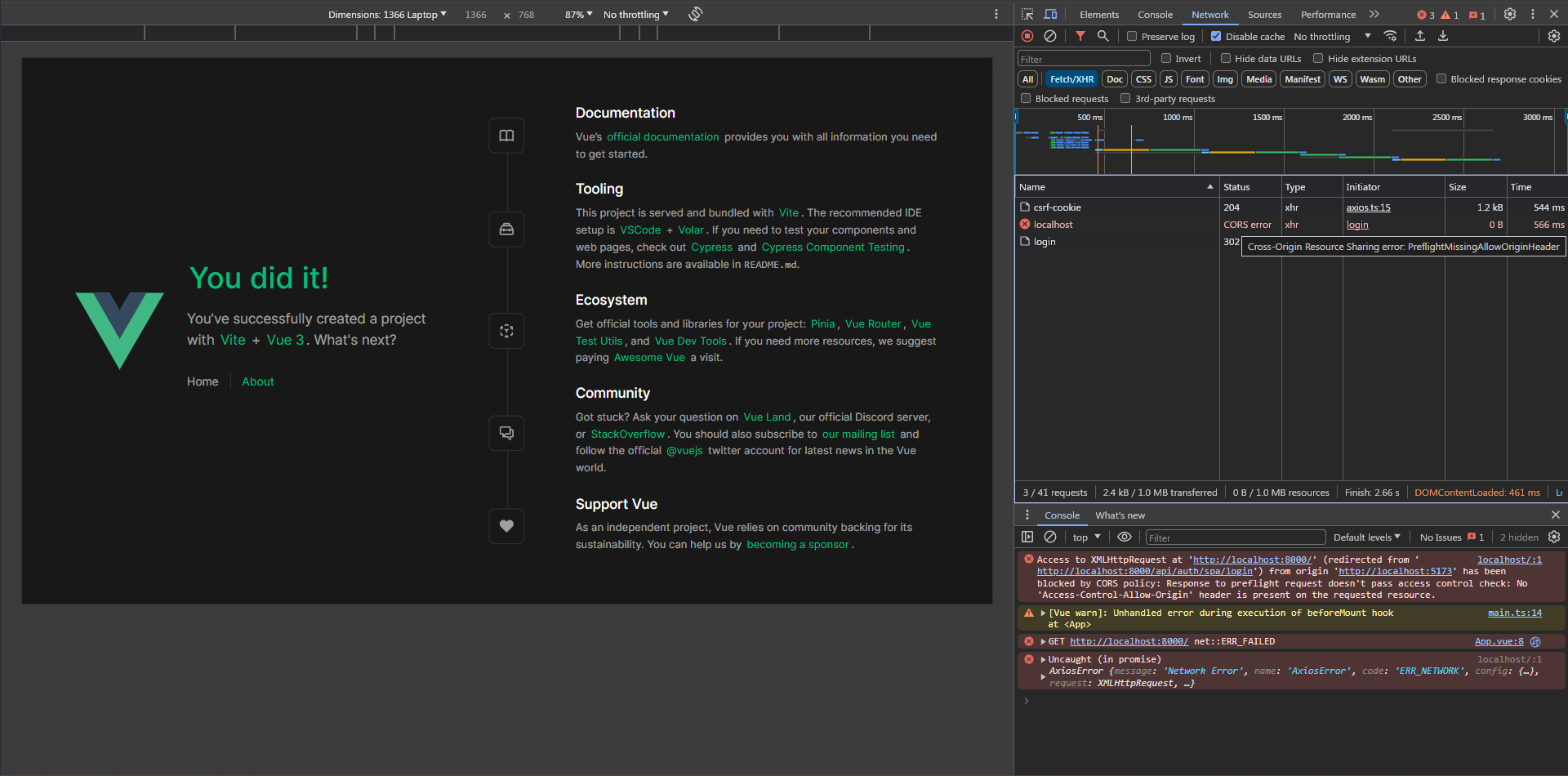
Oops! It says `PreflightMissingAllowOriginHeader`! but we have this one set already, so what's going on?
Actually, this happens due to the guest middleware that's applied to the login route which enables the `RedirectIfAuthenticated` middleware, and when the user logs in again, this middleware redirects him to the `/` route. so we need to turn this off, as we don't need any redirects happening in our API.
If you're using Laravel 10 or below, navigate to `app/Http/Middleware/RedirectIfAuthenticated.php` and update the handle method to return a JSON response instead of a redirect
```php
class RedirectIfAuthenticated
{
public function handle(Request $request, Closure $next, string ...$guards): Response
{
$guards = empty($guards) ? [null] : $guards;
foreach ($guards as $guard) {
if (Auth::guard($guard)->check()) {
if ($request->expectsJson()) {
return response()->json(['message' => __('Already Authenticated')], 403);
}
return redirect(RouteServiceProvider::HOME);
}
}
return $next($request);
}
}
```
For Laravel 11 users, we need to update `bootstrap/app.php` like this
```
use App\Exceptions\AlreadyAuthenticatedException;
// ...
use Illuminate\Http\Request;
// ...
->withMiddleware(function (Middleware $middleware) {
$middleware->statefulApi();
$middleware->redirectUsersTo(function (Request $request) {
if ($request->expectsJson()) {
throw new AlreadyAuthenticatedException();
}
return '/';
});
})
// ...
```
As you can see, we'll throw a custom exception if the user tries to log in while he's already authenticated. Now, let's create that custom exception
```bash
php artisan make:exception AlreadyAuthenticatedException
```
Here's the implementation
```php
json(['message' => __('Already Authenticated')], 403);
}
}
```
Yes, I can hear you. Why do we need all this? Why did you add the return statement directly to the file?
Excellent question, the value returned by `redirectUsersTo` will be used in `RedirectIfAuthenticated` middleware like this:
```php
public function handle(Request $request, Closure $next, string ...$guards): Response
{
$guards = empty($guards) ? [null] : $guards;
foreach ($guards as $guard) {
if (Auth::guard($guard)->check()) {
return redirect($this->redirectTo($request)); // 👈🏻👈🏻👈🏻 it's used as an argument for `redirect` function
}
}
return $next($request);
}
/**
* Get the path the user should be redirected to when they are authenticated.
*/
protected function redirectTo(Request $request): ?string
{
return static::$redirectToCallback
? call_user_func(static::$redirectToCallback, $request)
: $this->defaultRedirectUri();
}
```
That's why it has to be like this, at least for now. You can customize it however you like; feel free to do what suits you better. For now, Let's test the result
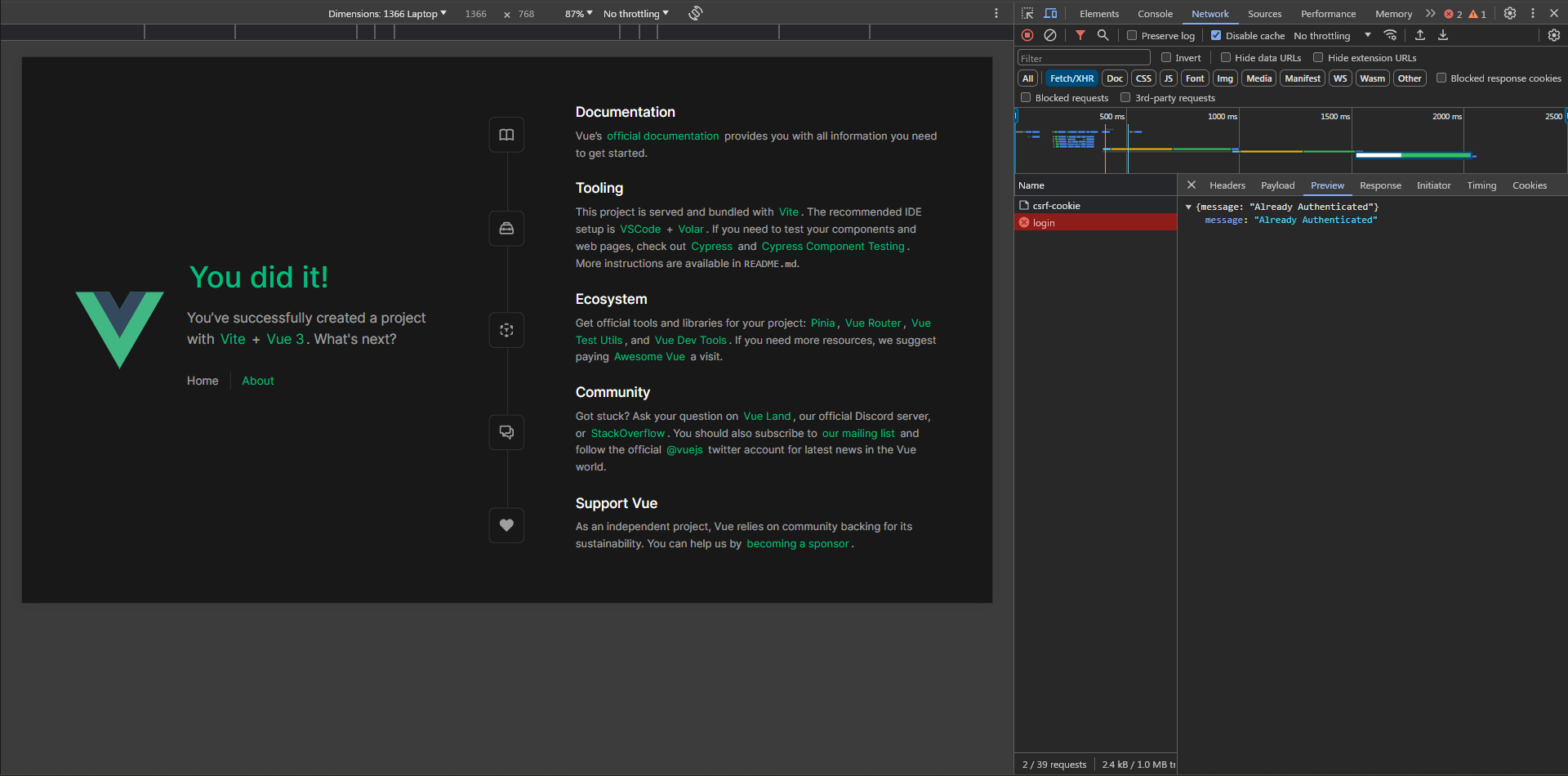
Perfect!
### What if the backend is deployed but frontend is served locally?
First, I'll emulate the situation. I used to run the project using `php artisan serve` command but now I'll use [Laragon](https://laragon.org/) to run it on this domain `sanctum-cookie.test`, to do that simply place the project's folder in Laragon's `www` directory and hit the reload button!
Note: `sanctum-cookie` is the name of the project folder inside the `www` folder which is why `sanctum-cookie.test` is the domain for it
Next, I'll update the `VITE_BACKEND_URL` in `.env` to `http://sanctum-cookie.test/api`. Also, I'll clear the cookies and try.
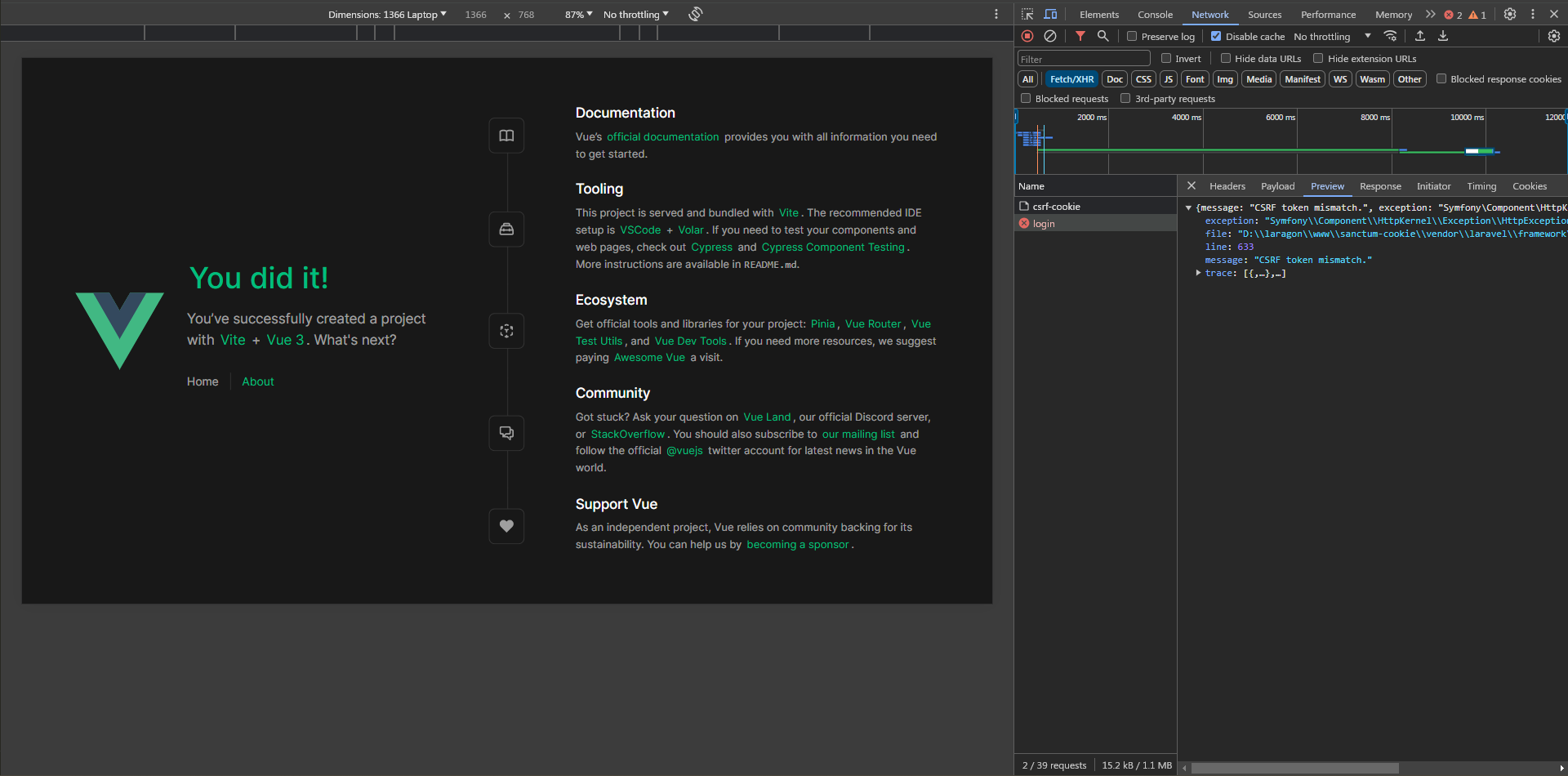
The first request to `/api/csrf-cookie` works but the login request doesn't.
It says `CSRF token mismatch` which obviously means that the `X-XSRF-TOKEN` header wasn't sent or it has an incorrect value, let's inspect the request headers
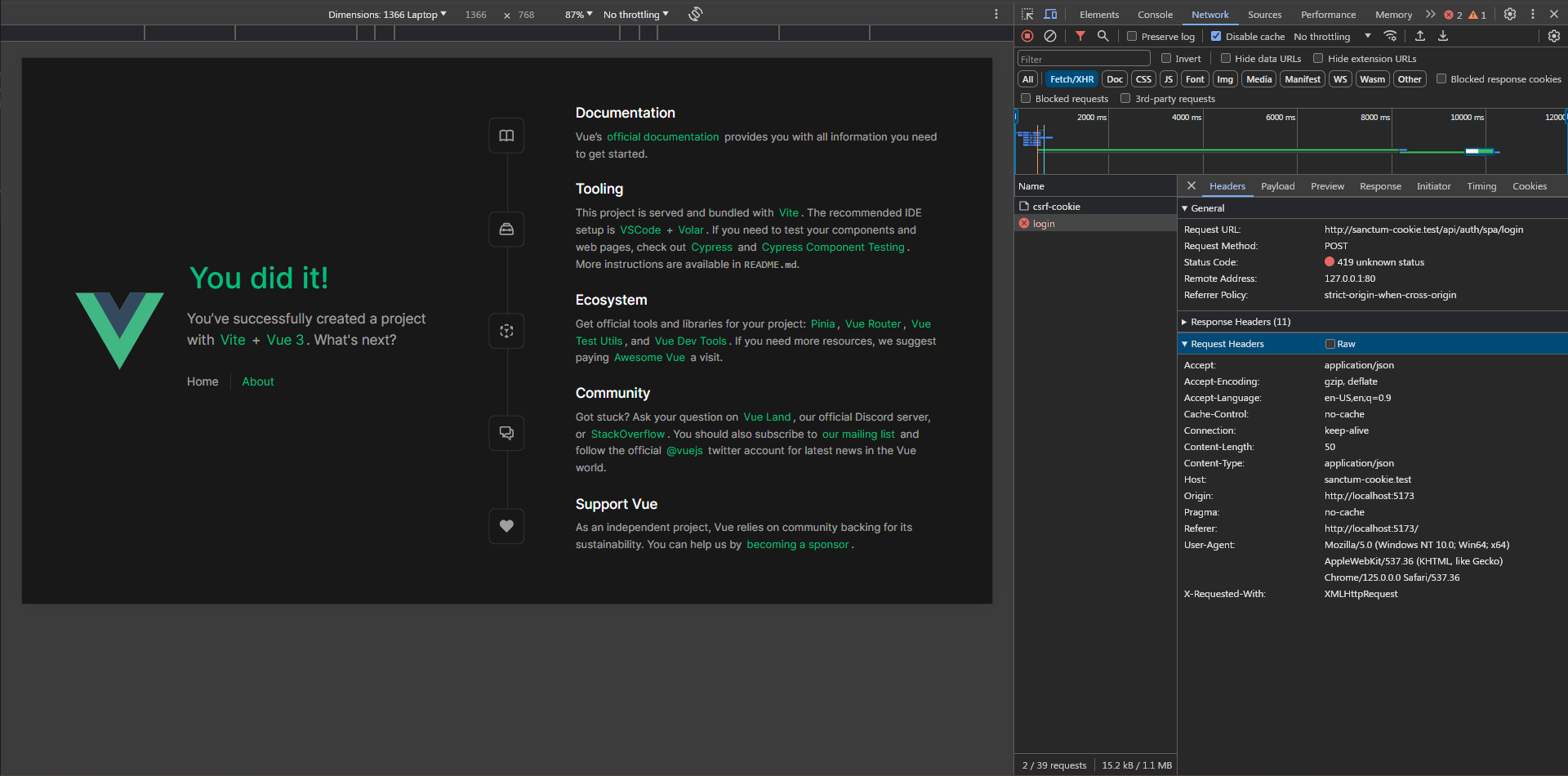
and sure enough, it doesn't exist. If you remember, this header takes its value from the `XSRF-TOKEN` cookie which is set when requesting `/api/csrf-cookie`, which means we need to take a look at the response headers of that request although it looks like it is working.
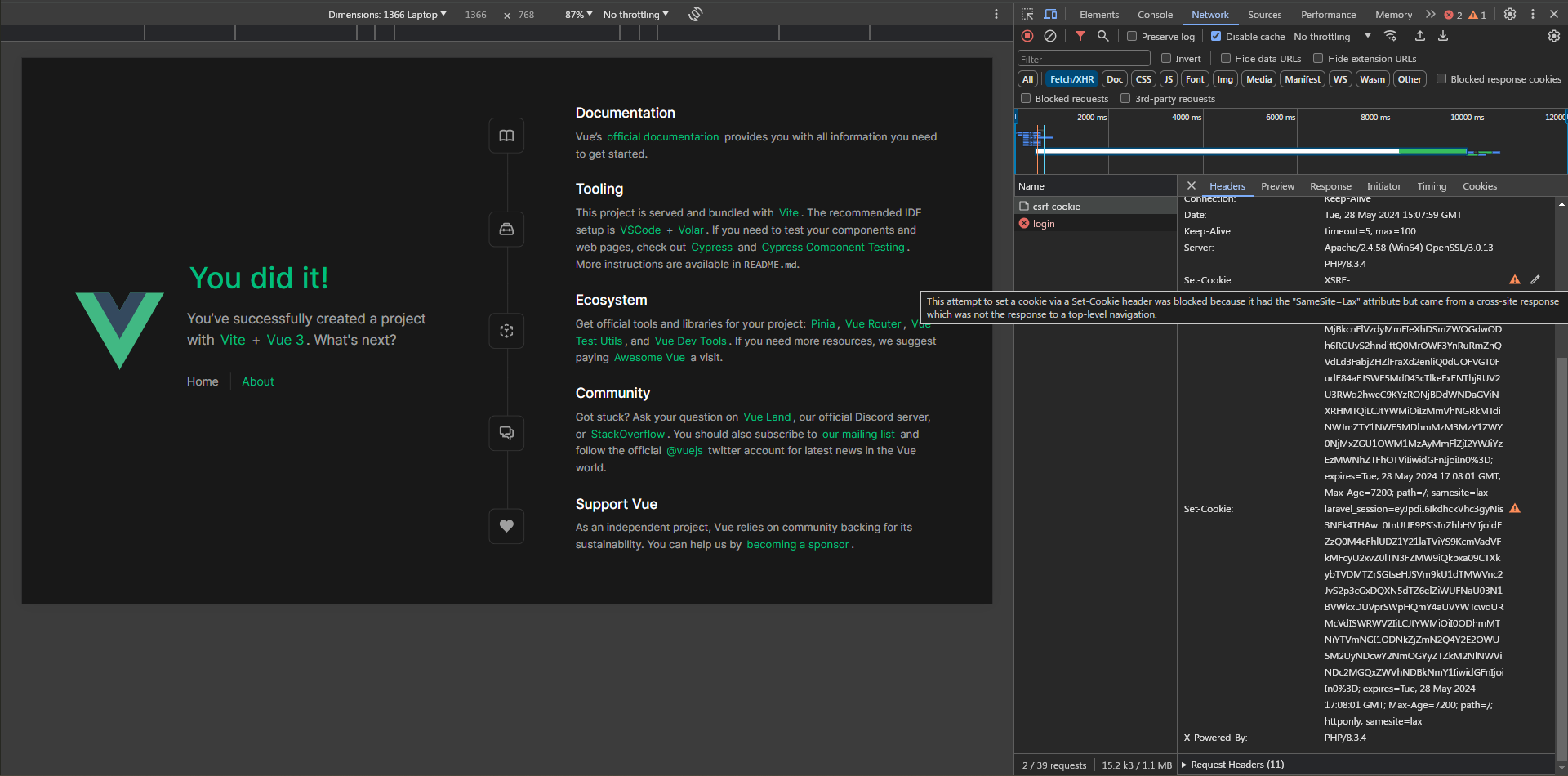
As we can see if we hover over the warning sign we notice that the browser couldn't set the cookies because the `samesite` is set `lax`. This means the server allows cookies to be set only to the same top-level domain (which we mentioned when configuring the frontend domain). Now we know what caused the problem let's get to the **solution**, We'll use a reverse proxy which will set both applications under the same domain. In our case, frontend will be served from `localhost:5371` and the backend will be served from `localhost:5371/api` we will do that **without** touching anything with Laragon or the backend. To do that we need to configure a proxy server in `vite.config.ts`
```typescript
import { fileURLToPath, URL } from 'node:url'
import { defineConfig, loadEnv } from 'vite'
import vue from '@vitejs/plugin-vue'
// https://vitejs.dev/config/
export default ({ mode }) => {
process.env = { ...process.env, ...loadEnv(mode, process.cwd()) }
return defineConfig({
plugins: [vue()],
resolve: {
alias: {
'@': fileURLToPath(new URL('./src', import.meta.url))
}
},
server: {
proxy: {
'/api': process.env.VITE_BACKEND_URL
}
}
})
}
```
We're are NOT ready yet but I want to show you why, Let's try to check the browser
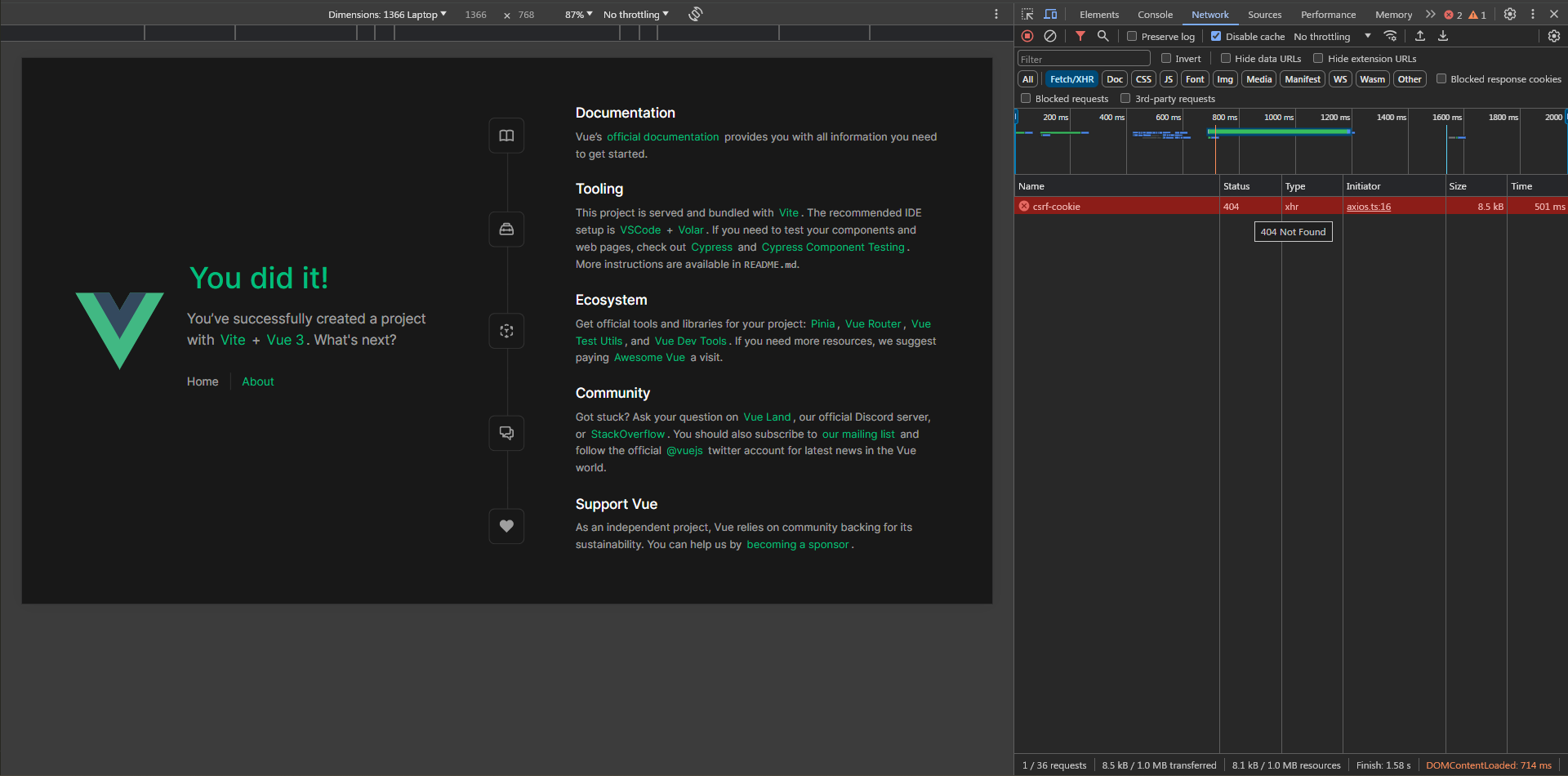
We got `404` because the `/api` proxy is pointed at `http://sanctum-cookie.test/api` which means when requesting `http://localhost:5173/api/csrf-cookie` it becomes `http://sanctum-cookie.test/api/api/csrf-cookie`!
Our final step is to update the `VITE_BACKEND_URL` in `.env` to `http://sanctum-cookie.test` and restart the app because `.env` changes don't get reflected immediately.
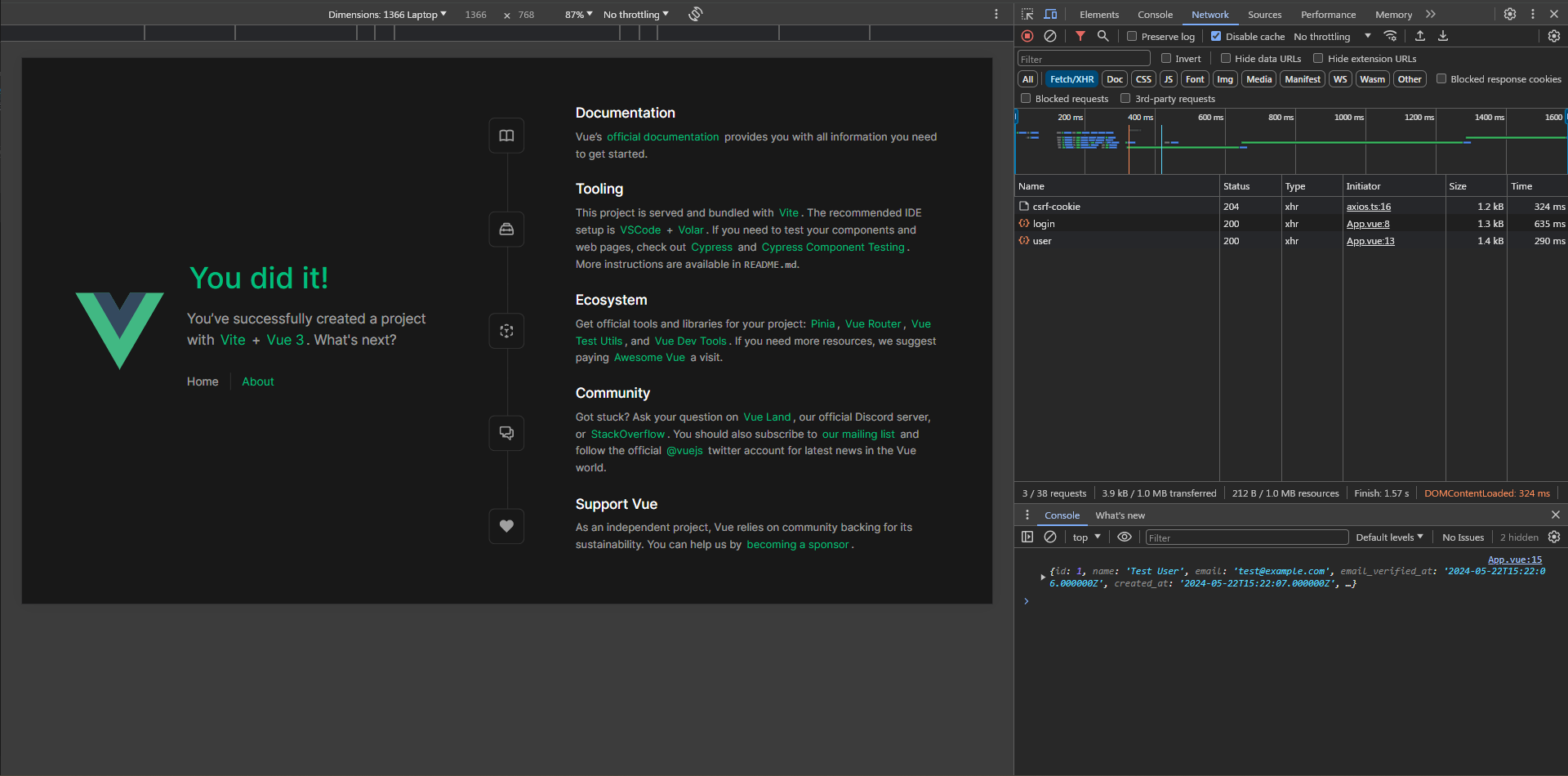
Perfect! This issue is very common, I hope it won't trouble you again.
### How do we enable API tokens for mobile development with the current setup?
Simple enough, Add the `HasApiKeys` trait to the user model then, implement another `login` route like this one
```php
// routes/api.php
use App\Http\Controllers\Api\Auth\Mobile\LoginController;
Route::prefix('auth/mobile')->group(function (){
Route::post('login', LoginController::class)->middleware('guest');
});
// Mobile\LoginController
public function __invoke(Request $request)
{
$credentials = $request->validate([
'email' => ['required', 'email'],
'password' => ['required'],
]);
if (Auth::attempt($credentials)) {
$token = $request->user()->createToken($request->token_name);
return response()->json(['message' => __('Welcome!'), 'token' => $token->plainTextToken]);
}
throw ValidationException::withMessages([
'email' => __('The provided credentials do not match our records.'),
]);
}
```
Done! You don't need extra steps as Sanctum will use the `Authorization` header if it doesn't find the authentication cookie. One last thing to note, make sure that you don't send the `Referer` header from the mobile app as this will make Sanctum think that.

#### Your product deserves grown-up leadership
We join fast-moving teams to bring calm, clarity, and technical strategy when it matters most.
[Book a CTO consultation](https://madewithlove.com/cto-as-a-service/)
## Final words
I hope that you benefit from this article. I did my best to cover all possible errors. Feel free to reach out to me on [LinkedIn](https://linkedin.com/in/RoduanKD) or [Telegram](https://t.me/Roduan).
I admit that setting up cookie-based authentication was a bit harder than token-based authentication, but it's hard when you don't understand what's happening under the hood. I hope you had many aha moments and it's crystal clear now.
Thanks for reading and have a bug-free development!
our bi-weekly show
[](https://open.spotify.com/show/4IcBDfZ0n0I00Ek1jc6TsK?si=65d3167035bf433d)
Follow our bi-weekly insights on Spotify: where Dimitri and Andreas discuss what they're seeing at SaaS teams and trends they're watching closely.
[Listen on Spotify ](https://open.spotify.com/show/4IcBDfZ0n0I00Ek1jc6TsK?si=65d3167035bf433d)
## Resources
- [https://youtu.be/pcZEC\_AkZeA?t=648](https://youtu.be/pcZEC%5FAkZeA?t=648&si=Lh5Q-xAtlq9uvtZI)
- [https://youtube.com/watch?v=HYO8OuLuTFw](https://www.youtube.com/watch?v=HYO8OuLuTFw)
-
-
-
-
-
### Postman Collection
[https://postman.com/speeding-eclipse-208717/workspace/sanctum-cookie-based-authentication](https://www.postman.com/speeding-eclipse-208717/workspace/sanctum-cookie-based-authentication)